nextjs-subscription-payments服务器推送:提升内容更新效率
nextjs-subscription-payments服务器推送:提升内容更新效率
【免费下载链接】nextjs-subscription-payments Clone, deploy, and fully customize a SaaS subscription application with Next.js.  项目地址: https://gitcode.com/gh_mirrors/ne/nextjs-subscription-payments
你是否还在为SaaS应用的内容更新延迟而烦恼?用户付费后需要手动刷新页面才能看到订阅内容?本文将详细介绍nextjs-subscription-payments项目中服务器推送(Webhook)机制的实现,帮助你彻底解决这些问题,提升内容更新效率。读完本文,你将了解如何利用Stripe Webhook实现订阅状态的实时同步,掌握服务器推送的核心代码逻辑,并学会在实际项目中应用这一技术。
服务器推送机制概述
在传统的Web应用中,客户端需要不断轮询服务器以获取最新数据,这不仅浪费资源,还会导致内容更新延迟。而服务器推送(Webhook)技术则允许服务器主动向客户端发送数据,实现实时更新。在nextjs-subscription-payments项目中,服务器推送主要用于处理Stripe的支付事件,如订阅创建、更新、取消等,确保用户的订阅状态能够实时同步到应用中。
项目的服务器推送功能主要通过app/api/webhooks/route.ts文件实现,该文件定义了一个API路由,用于接收Stripe发送的Webhook事件。当Stripe上发生订阅相关事件时,会向该API路由发送POST请求,应用服务器处理这些事件后,更新数据库中的订阅状态,并可能触发后续的业务逻辑,如授予用户访问权限、发送通知等。
Webhook事件处理流程
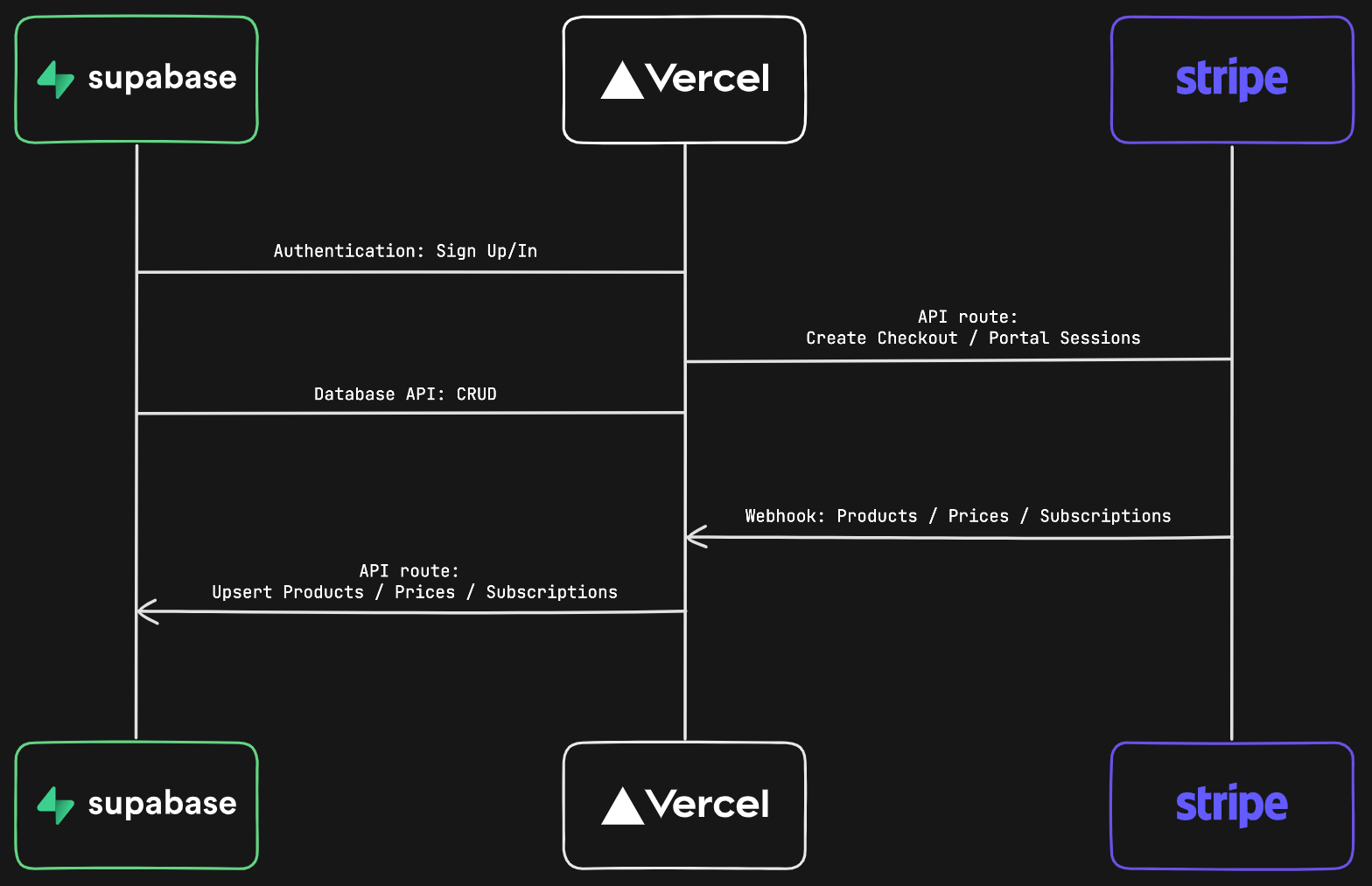
nextjs-subscription-payments项目的Webhook事件处理流程可以分为以下几个步骤:
- 接收事件:app/api/webhooks/route.ts中的POST函数接收Stripe发送的Webhook事件。
- 验证事件:使用Stripe提供的签名和密钥验证事件的真实性,防止恶意请求。
- 过滤事件:只处理与订阅相关的事件,如
customer.subscription.created、customer.subscription.updated等。 - 处理事件:根据事件类型调用相应的处理函数,如utils/supabase/admin.ts中的
manageSubscriptionStatusChange函数。 - 更新数据:处理函数更新Supabase数据库中的订阅状态,确保数据与Stripe同步。
核心代码解析
事件接收与验证
app/api/webhooks/route.ts文件是Webhook事件处理的入口。以下是该文件的核心代码:
export async function POST(req: Request) {
  const body = await req.text();
  const sig = req.headers.get('stripe-signature') as string;
  const webhookSecret = process.env.STRIPE_WEBHOOK_SECRET;
  let event: Stripe.Event;

  try {
    if (!sig || !webhookSecret)
      return new Response('Webhook secret not found.', { status: 400 });
    event = stripe.webhooks.constructEvent(body, sig, webhookSecret);
    console.log(`🔔  Webhook received: ${event.type}`);
  } catch (err: any) {
    console.log(`❌ Error message: ${err.message}`);
    return new Response(`Webhook Error: ${err.message}`, { status: 400 });
  }
  // ...后续处理代码
}
这段代码首先从请求中获取原始数据和Stripe签名,然后使用stripe.webhooks.constructEvent方法验证事件的真实性。验证通过后,事件对象被解析出来,后续代码会根据事件类型进行处理。
事件处理逻辑
在验证事件之后,代码会检查事件类型是否在相关事件列表中。如果是相关事件,则调用相应的处理函数:
if (relevantEvents.has(event.type)) {
  try {
    switch (event.type) {
      case 'product.created':
      case 'product.updated':
        await upsertProductRecord(event.data.object as Stripe.Product);
        break;
      case 'price.created':
      case 'price.updated':
        await upsertPriceRecord(event.data.object as Stripe.Price);
        break;
      case 'customer.subscription.created':
      case 'customer.subscription.updated':
      case 'customer.subscription.deleted':
        const subscription = event.data.object as Stripe.Subscription;
        await manageSubscriptionStatusChange(
          subscription.id,
          subscription.customer as string,
          event.type === 'customer.subscription.created'
        );
        break;
      // ...其他事件处理
      default:
        throw new Error('Unhandled relevant event!');
    }
  } catch (error) {
    // 错误处理
  }
}
这里的manageSubscriptionStatusChange函数来自utils/supabase/admin.ts文件,负责更新用户的订阅状态。
订阅状态更新
utils/supabase/admin.ts中的manageSubscriptionStatusChange函数是更新订阅状态的核心:
const manageSubscriptionStatusChange = async (
  subscriptionId: string,
  customerId: string,
  createAction = false
) => {
  // 获取用户UUID
  const { data: customerData, error: noCustomerError } = await supabaseAdmin
    .from('customers')
    .select('id')
    .eq('stripe_customer_id', customerId)
    .single();

  if (noCustomerError) throw new Error(`Customer lookup failed: ${noCustomerError.message}`);
  const { id: uuid } = customerData!;

  // 获取订阅详情
  const subscription = await stripe.subscriptions.retrieve(subscriptionId, {
    expand: ['default_payment_method']
  });

  // 更新订阅数据到数据库
  const subscriptionData: TablesInsert<'subscriptions'> = {
    id: subscription.id,
    user_id: uuid,
    status: subscription.status,
    price_id: subscription.items.data[0].price.id,
    // ...其他订阅相关字段
  };

  const { error: upsertError } = await supabaseAdmin
    .from('subscriptions')
    .upsert([subscriptionData]);
  if (upsertError) throw new Error(`Subscription update failed: ${upsertError.message}`);
};
该函数首先通过Stripe客户ID查找用户在Supabase中的UUID,然后获取订阅详情,最后将订阅状态更新到Supabase的subscriptions表中。
实际应用与优势
实时订阅状态同步
通过Webhook机制,nextjs-subscription-payments项目能够实时同步用户的订阅状态。当用户在Stripe上完成订阅、更新订阅或取消订阅时,Stripe会立即发送Webhook事件到应用服务器,服务器处理事件后更新数据库,确保用户在应用中的订阅状态与Stripe保持一致。这种实时同步避免了传统轮询方式带来的延迟,提升了用户体验。
自动化业务流程
Webhook事件处理不仅可以更新订阅状态,还可以触发其他业务流程。例如,当用户成功订阅后,应用可以自动授予用户访问高级功能的权限,或者发送欢迎邮件。这些自动化流程减少了人工干预,提高了运营效率。
提高系统可靠性
Webhook机制采用异步处理方式,即使应用服务器暂时不可用,Stripe也会重试发送事件,确保事件最终被处理。此外,utils/supabase/admin.ts中的代码还实现了重试逻辑,如在插入价格记录时处理外键约束错误:
if (upsertError?.message.includes('foreign key constraint')) {
  if (retryCount < maxRetries) {
    await new Promise(resolve => setTimeout(resolve, 2000));
    await upsertPriceRecord(price, retryCount + 1, maxRetries);
  } else {
    throw new Error(`Price insert failed after retries: ${upsertError.message}`);
  }
}
这种重试机制进一步提高了系统的可靠性。
总结与展望
nextjs-subscription-payments项目通过Webhook机制实现了服务器推送功能,有效提升了内容更新效率和用户体验。核心实现位于app/api/webhooks/route.ts和utils/supabase/admin.ts文件中,通过接收、验证和处理Stripe事件,实时同步订阅状态到数据库。
未来,可以进一步扩展Webhook的功能,例如处理更多类型的事件(如发票支付成功/失败),或者集成其他服务的Webhook,实现更复杂的业务流程自动化。此外,还可以优化事件处理的性能,如使用队列系统处理高并发事件,确保系统的稳定性和可扩展性。
通过本文的介绍,相信你已经对nextjs-subscription-payments项目的服务器推送机制有了深入了解。如果你想进一步学习,可以查看项目的README.md获取更多信息,或者直接阅读相关源代码,如app/api/webhooks/route.ts和utils/supabase/admin.ts。
【免费下载链接】nextjs-subscription-payments Clone, deploy, and fully customize a SaaS subscription application with Next.js. 项目地址: https://gitcode.com/gh_mirrors/ne/nextjs-subscription-payments