基于OpenHarmony鸿蒙开发新闻资讯APP
文章目录
- 一、前言
- 二、项目概述
- 三、项目架构概览
- 四、核心功能模块
- 1. 用户系统
- 2. 新闻系统
- 3. 视频系统
- 4. 项目结构
- 四、技术架构
- 五、核心业务功能实现详细分析
- 1. 用户登录功能
- 2. 用户注册功能
- 3. 用户信息管理
- 3. 新闻分类浏览
- 4. 新闻详情展示
- 5. 新闻搜索功能
- 6. 收藏功能
- 7. 收藏列表管理
- 8. 视频播放
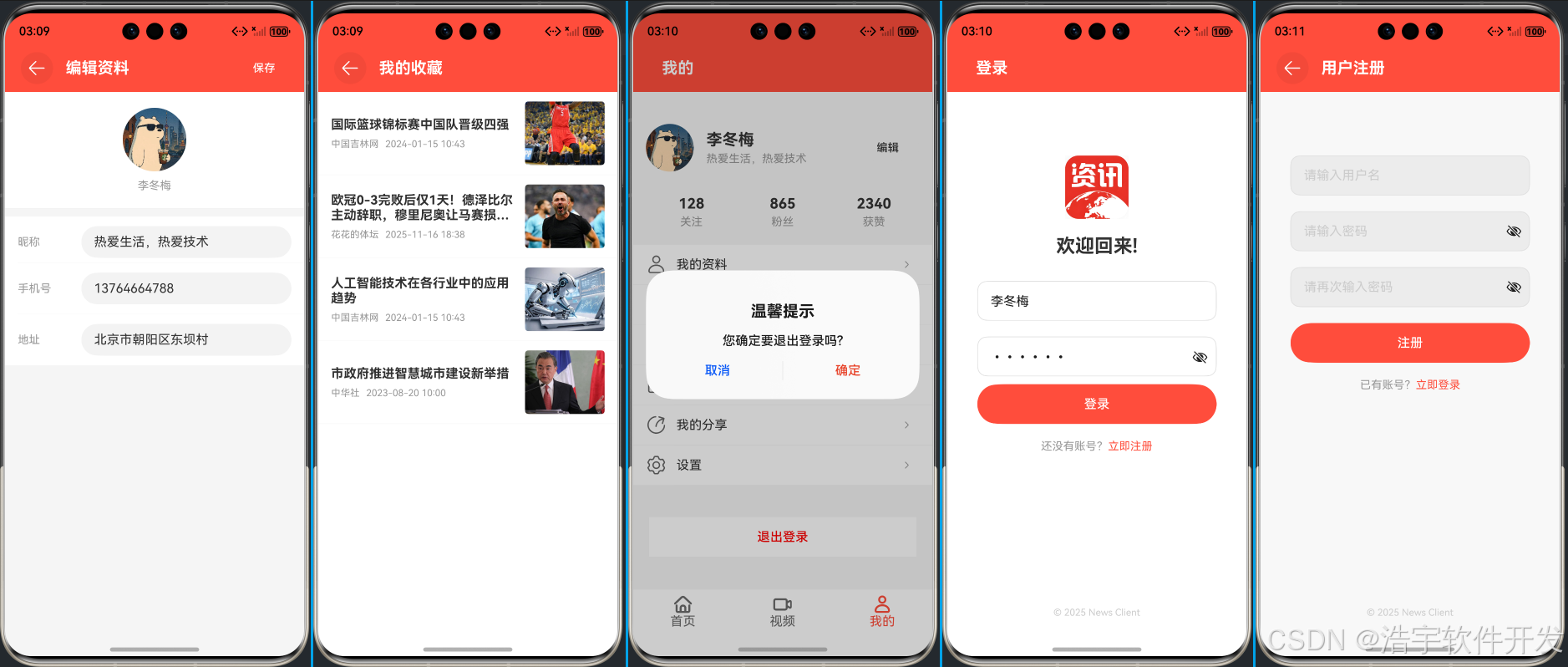
- 六、项目运行效果截图
一、前言
随着移动互联网的快速发展,新闻资讯类应用已成为人们获取信息的重要渠道。HarmonyOS作为华为推出的新一代分布式操作系统,以其独特的技术优势和生态能力,为开发者提供了全新的应用开发体验。本文将深入分析一个基于HarmonyOS开发的新闻客户端项目,从架构设计、功能实现到技术特性进行全面解读,帮助开发者更好地理解和掌握HarmonyOS应用开发的核心要点。
在当今移动应用开发领域,HarmonyOS凭借其分布式架构、一次开发多端部署、原生性能等优势,正逐渐成为开发者的新宠。通过实际项目案例的学习,我们能够更直观地感受到HarmonyOS的技术魅力和开发便利性。
二、项目概述
本项目是一个基于HarmonyOS开发的新闻客户端应用,旨在为用户提供优质的新闻阅读和视频观看体验。该应用集成了新闻浏览、视频播放、用户管理、内容收藏等核心功能,是一个功能完备的移动端资讯平台。
三、项目架构概览
该项目采用典型的HarmonyOS应用结构,使用ArkUI框架开发,分为多个功能模块:
- API层: api - 统一管理后端接口
- 组件层: component - 可复用UI组件
- 控制器层: controller - 业务逻辑控制器
- HTTP层: http - 网络请求封装
- 模型层: model - 数据模型定义
- 页面层: pages - 应用页面
- 工具层: utils - 工具类
四、核心功能模块
1. 用户系统
- 登录、注册: 完整的用户身份验证流程
- 个人中心: 用户信息管理、统计数据展示(统计数据模块为静态页面)
- 会话管理: 用户状态持久化存储
2. 新闻系统
- 分类浏览: 多类别新闻内容展示
- 详情阅读: 丰富的新闻内容呈现
- 搜索功能: 新闻内容检索能力
- 互动功能: 点赞、收藏、评论、分享 (目前已实现收藏)
3. 视频系统
- 视频播放: 基于AVPlayer的高质量视频播放
- 播放控制: 完整的播放控制功能
- 全屏播放: 流畅的全屏播放体验
4. 项目结构
Harmony-news-client/
├── AppScope/                 # 应用级资源和配置
├── entry/                   # 主模块
│   ├── src/main/ets/        # ArkTS源代码
│   │   ├── api/            # API配置
│   │   ├── component/      # UI组件库
│   │   ├── controller/     # 控制器层
│   │   ├── http/           # HTTP请求封装
│   │   ├── model/          # 数据模型
│   │   ├── pages/          # 页面组件
│   │   └── utils/          # 工具类
│   └── src/main/resources/  # 应用资源
├── hvigor/                  # 构建工具配置
└── oh-package.json5         # 依赖包管理
四、技术架构
- 开发语言: ArkTS
- UI框架: ArkUI
- 运行环境: HarmonyOS
- 构建工具: Hvigor
五、核心业务功能实现详细分析
1. 用户登录功能
- 实现位置: LoginPage.ets
- 功能流程:
1. 用户输入用户名和密码
2. 前端表单验证(用户名≥3字符,密码≥6字符)
3. 调用后端登录接口 ApiConfig.LOGIN_URL
4. 接收响应并判断登录结果
5. 登录成功则跳转至首页,保存用户信息到AppStorage
6. 登录失败则显示错误信息 - 数据模型: 使用 UserInfo 存储用户信息
 /**
   * 处理登录
   */
  async handleLogin() {
    // 简单验证
    if (!this.username || this.username.length < 3) {
      this.errorMsg = '用户名至少3位字符'
      return
    }

    if (!this.password || this.password.length < 6) {
      this.errorMsg = '密码至少6位字符'
      return
    }

    this.loading = true
    this.errorMsg = ''

    try {
      const res = await get(ApiConfig.LOGIN_URL, {
        params: {
          "username": this.username,
          "password": this.password,

        }
      })

      if (res.success) {
        // 登录成功,跳转到首页
        this.getUIContext().getRouter().pushUrl({
          url: 'pages/IndexPage'
        })

        //全局保存用户信息
        AppStorage.setOrCreate<UserInfo>('userInfo', res.data as UserInfo)
      } else {
        this.errorMsg = res.msg || '登录失败'
      }
    } catch (error) {
      this.errorMsg = '网络请求失败,请检查网络连接'
      console.error('登录失败:', error)
    } finally {
      this.loading = false
    }
  }
2. 用户注册功能
- 实现位置: RegisterPage.ets
- 功能流程:
1. 用户填写注册信息
2. 前端表单验证
3. 调用后端注册接口 ApiConfig.REGISTER_URL
4. 处理注册结果并给出相应提示
 /**
   * 处理注册
   */
  async handleRegister() {
    // 简单验证
    if (!this.username || this.username.length < 3) {
      this.errorMsg = '用户名至少3位字符'
      return
    }

    if (!this.password || this.password.length < 6) {
      this.errorMsg = '密码至少6位字符'
      return
    }

    if (this.password !== this.confirmPassword) {
      this.errorMsg = '两次输入的密码不一致'
      return
    }

    this.loading = true
    this.errorMsg = ''

    try {
      const res = await get(ApiConfig.REGISTER_URL, {
        params: {
          "username": this.username,
          "password": this.password,
          "nickname": "热爱生活,热爱技术",
          "avatar": "https://q9.itc.cn/q_70/images03/20250730/7e535ac6918d44c4a0ab740ed9aa349d.jpeg"
        }
      })

      if (res.success) {
        // 注册成功,跳转到登录页面
        this.goToLogin()

      } else {
        this.errorMsg = res.msg || '注册失败'
      }
    } catch (error) {
      this.errorMsg = '网络请求失败,请检查网络连接'
      console.error('注册失败:', error)
    } finally {
      this.loading = false
    }
  }
3. 用户信息管理
- 实现位置: UserInfoEditPage.ets 和 MineComponent.ets
- 功能流程:
1. 显示当前用户信息
2. 允许编辑用户资料
3. 调用更新接口 ApiConfig.EDIT_USER_INFO_URL
4. 更新本地用户信息缓存
/**
   * 保存用户信息
   */
  async saveUserInfo() {
    // 简单验证
    if (!this.userInfo!!.nickname || this.userInfo!!.nickname.length < 2) {
      this.errorMsg = '昵称至少2位字符'
      return
    }

    if (this.userInfo!!.mobile && !/^1[3-9]d{9}$/.test(this.userInfo!!.mobile)) {
      this.errorMsg = '请输入正确的手机号'
      return
    }

    this.loading = true
    this.errorMsg = ''
    this.successMsg = ''

    try {
      const res = await postForm(ApiConfig.EDIT_USER_INFO_URL, {
        body: {
          "uid": this.userInfo!!.uid,
          "nickname": this.userInfo!!.nickname,
          "mobile": this.userInfo!!.mobile,
          "sign": this.userInfo!!.sign,
          "address": this.userInfo!!.address
        }
      })

      if (res.success) {
        this.successMsg = '保存成功'
        // 延迟返回上一页
        setTimeout(() => {
          this.getUIContext().getRouter().back()
        }, 1000)
      } else {
        this.errorMsg = res.msg || '保存失败'
      }
    } catch (error) {
      this.errorMsg = '网络请求失败,请检查网络连接'
      console.error('保存用户信息失败:', error)
    } finally {
      this.loading = false
    }
  }
3. 新闻分类浏览
- 实现位置: TabItemComponent.ets 和 HomeComponent.ets
- 功能流程:
1. 页面加载时自动请求对应分类新闻
2. 调用 ApiConfig.QUERY_NEWS_CATEGORY_URL 接口
3. 解析返回的新闻列表数据
4. 使用 NewsItemComponent 渲染新闻列表
5. 处理加载状态、错误状态和空数据状态
@Component
export struct HomeComponent {
  titles: string[] = ["推荐", "军事", "教育", "文化", "健康", "财经", "体育", "汽车", "科技"]
  @State currentIndex: number = 0

  @Builder
  tabBuilder(title: string, targetIndex: number) {
    Text(title)
      .padding(10)
      .fontSize(18)
      .fontColor(this.currentIndex === targetIndex ? '#ff4d3b' : '#333333')
      .fontWeight(this.currentIndex === targetIndex ? FontWeight.Bold : FontWeight.Normal)
  }

  build() {
    Column() {
      // 增加一个新闻搜索入口
      Row() {
        // 搜索框
        Image($r('app.media.ic_logo')).width(36).margin({ right: 10 })
        Row() {
          SymbolGlyph($r('sys.symbol.magnifyingglass'))
            .fontSize(20)
            .fontColor(['#999999'])

          Text('搜索新闻...')
            .fontSize(16)
            .fontColor('#999999')
            .layoutWeight(1)
            .padding({ left: 8 })
        }
        .width('80%')
        .height(40)
        .backgroundColor('#f5f5f5')
        .borderRadius(20)
        .padding({ left: 16, right: 16 })
        .onClick(() => {
          // 跳转到搜索页面
          this.getUIContext().getRouter().pushUrl({
            url: 'pages/NewsSearchPage'
          })
        })
      }
      .width('100%')
      .justifyContent(FlexAlign.Center)
      .padding({ top: 10, bottom: 10 })

      Tabs() {
        ForEach(this.titles, (item: string, index: number) => {
          TabContent() {
            if (index==0) {
              TabItem2Component({
                title: item
              })
            }else {
              TabItemComponent({
                title: item
              })
            }


          }
          .tabBar(this.tabBuilder(item, index))
        })
      }
      .layoutWeight(1)

      .barMode(BarMode.Scrollable)
      .onChange((index: number) => {
        this.currentIndex = index
      })

    }
    .width('100%')
    .expandSafeArea([SafeAreaType.SYSTEM], [SafeAreaEdge.TOP])
  }
}
4. 新闻详情展示
- 实现位置: NewsDetailPage.ets
- 功能流程:
1. 从路由参数获取新闻信息
2. 检查当前用户是否已收藏该新闻
3. 显示新闻标题、作者、时间、图片和详细内容
@Entry
@Component
export struct NewsDetailPage {
  @StorageLink('userInfo') userInfo: UserInfo | null = null
  @State newsInfo: NewsInfo = {
    news_id: 0,
    title: '',
    news_img: '',
    details: '',
    author: '',
    news_type: '',
    create_time: ''
  }
  @State loading: boolean = false
  @State error: string = ''
  @State isLiked: boolean = false
  @State isFavorite: boolean = false
  @State likeCount: number = 128
  @State commentCount: number = 36
  newsId: number = 0

  aboutToAppear(): void {
    // 从路由参数中获取新闻ID
    let params = this.getUIContext().getRouter().getParams() as NewsInfo
    if (params) {
      this.newsInfo = params

      //检擦是否收藏过
      this.checkIsFavorite()
    }
  }

  /**
   * 检擦是否收藏过
   */
  async checkIsFavorite() {
    const res = await postForm(ApiConfig.IS_COLLECT_URL, {
      body: {
        "news_id": this.newsInfo.news_id,
        "user_id": this.userInfo!!.uid,
      }
    })

    if (res.success) {
      this.isFavorite = false
    } else {
      this.isFavorite = true
    }

  }

  /**
   * 处理点赞
   */
  handleLike() {
    this.isLiked = !this.isLiked
    this.likeCount = this.isLiked ? this.likeCount + 1 : this.likeCount - 1
    // TODO: 调用API保存点赞状态
  }

  /**
   * 处理收藏
   */
  async handleFavorite() {
    const res = await postForm(ApiConfig.FAVORITE_URL, {
      body: {
        "news_id": this.newsInfo.news_id,
        "user_id": this.userInfo!!.uid,
      }
    })

    if (res.success) {
      this.isFavorite = !this.isFavorite
    } else {
      this.getUIContext().getPromptAction().showToast({
        message: res.msg
      })
    }

  }

  /**
   * 处理分享
   */
  handleShare() {
    // TODO: 实现分享功能
    console.log('分享新闻:', this.newsInfo.title)
  }

  /**
   * 跳转到评论页面
   */
  goToComment() {
    // TODO: 实现评论功能
    console.log('跳转到评论页面')
  }

  build() {
    Column() {
      // 标题栏
      TopBarComponent({
        title: "新闻详情"
      })

      // 内容区域
      Scroll() {
        Column() {
          // 新闻标题
          Text(this.newsInfo.title)
            .fontSize(20)
            .fontWeight(FontWeight.Bold)
            .textAlign(TextAlign.Start)
            .padding({ left: 16, right: 16, top: 16 })

          // 新闻信息
          Row() {
            Text(this.newsInfo.author)
              .fontSize(14)
              .fontColor('#999999')

            Text(this.newsInfo.create_time)
              .fontSize(14)
              .fontColor('#999999')
              .margin({ left: 16 })

            Text(this.newsInfo.news_type)
              .fontSize(14)
              .fontColor('#999999')
              .margin({ left: 16 })
          }
          .padding({
            left: 16,
            right: 16,
            top: 12,
            bottom: 12
          })

          // 新闻图片
          if (this.newsInfo.news_img && this.newsInfo.news_img !== '') {
            // 使用容器来实现左右间距
            Row() {
              Image(this.newsInfo.news_img)
                .width('100%')
                .height(200)
                .objectFit(ImageFit.Cover)
            }
            .padding({ left: 16, right: 16, top: 10 })
          }

          // 新闻内容
          Text(this.newsInfo.details)
            .fontSize(16)
            .textAlign(TextAlign.Start)
            .padding({
              left: 16,
              right: 16,
              top: 16,
              bottom: 16
            })

          Blank().layoutWeight(1)
        }

      }
      .layoutWeight(1)

      // 底部功能栏
      Row() {
        // 分享
        Column() {
          SymbolGlyph($r('sys.symbol.share'))
            .fontSize(24)
            .fontColor(['#666666'])

          Text('分享')
            .fontSize(12)
            .fontColor('#999999')
            .margin({ top: 4 })
        }
        .layoutWeight(1)
        .justifyContent(FlexAlign.Center)
        .onClick(() => {
          this.handleShare()
        })

        // 评论
        Column() {
          SymbolGlyph($r('sys.symbol.combine'))
            .fontSize(24)
            .fontColor(['#666666'])

          Text(`评论 ${this.commentCount}`)
            .fontSize(12)
            .fontColor('#999999')
            .margin({ top: 4 })
        }
        .layoutWeight(1)
        .justifyContent(FlexAlign.Center)
        .onClick(() => {
          this.goToComment()
        })

        // 喜欢
        Column() {
          SymbolGlyph(this.isLiked ? $r('sys.symbol.heart_fill') : $r('sys.symbol.heart'))
            .fontSize(24)
            .fontColor(this.isLiked ? ['#ff4d3b'] : ['#666666'])

          Text(`喜欢 ${this.likeCount}`)
            .fontSize(12)
            .fontColor('#999999')
            .margin({ top: 4 })
        }
        .layoutWeight(1)
        .justifyContent(FlexAlign.Center)
        .onClick(() => {
          this.handleLike()
        })

        // 收藏
        Column() {
          SymbolGlyph(this.isFavorite ? $r('sys.symbol.bookmark_fill') : $r('sys.symbol.bookmark'))
            .fontSize(24)
            .fontColor(this.isFavorite ? ['#ff4d3b'] : ['#666666'])

          Text('收藏')
            .fontSize(12)
            .fontColor('#999999')
            .margin({ top: 4 })
        }
        .layoutWeight(1)
        .justifyContent(FlexAlign.Center)
        .onClick(() => {
          this.handleFavorite()
        })
      }
      .height(60)
      .backgroundColor('#ffffff')
      .border({ width: { top: 1 }, color: '#f0f0f0' })
    }
    .width('100%')
    .height('100%')
  }
}
5. 新闻搜索功能
- 实现位置: NewsSearchPage.ets 和 HomeComponent.ets
- 功能流程:
1. 在首页点击搜索框进入搜索页面
2. 调用 ApiConfig.SEARCH_URL 接口
3. 显示搜索结果列表
@Entry
@Component
struct NewsSearchPage {
  @State searchKeyword: string = ''
  @State searchResults: NewsInfo[] = []
  @State loading: boolean = false
  @State error: string = ''
  @State hasSearched: boolean = false

  /**
   * 搜索新闻
   */
  async searchNews() {
    if (!this.searchKeyword || this.searchKeyword.trim() === '') {
      this.error = '请输入搜索关键词'
      return
    }

    this.loading = true
    this.error = ''
    this.hasSearched = true

    try {
      const res = await get(ApiConfig.SEARCH_URL, {
        params: {
          "title": this.searchKeyword.trim()
        }
      })

      if (res.success) {
        const newsRes = res.data as NewsRes
        this.searchResults = newsRes.list
      } else {
        this.error = res.msg || '搜索失败'
      }
    } catch (err) {
      this.error = '网络请求失败,请检查网络连接'
      console.error('搜索新闻失败:', err)
    } finally {
      this.loading = false
    }
  }

  /**
   * 清空搜索结果
   */
  clearSearch() {
    this.searchKeyword = ''
    this.searchResults = []
    this.error = ''
    this.hasSearched = false
  }


  build() {
    Column() {
      // 标题栏
      Row() {
        Button('取消')
          .fontSize(16)
          .fontColor('#333333')
          .backgroundColor('#ffffff')
          .borderRadius(0)
          .height(40)
          .onClick(() => {
            this.getUIContext().getRouter().back()
          })

        // 搜索框
        Row() {
          SymbolGlyph($r('sys.symbol.magnifyingglass'))
            .fontSize(20)
            .fontColor(['#999999'])

          TextInput({
            placeholder: '请输入搜索关键词',
            text: this.searchKeyword
          })
            .placeholderColor('#cccccc')
            .backgroundColor('#f5f5f5')
            .fontSize(16)
            .layoutWeight(1)
            .padding({ left: 8 })
            .onChange((value: string) => {
              this.searchKeyword = value
            })
            .onSubmit(() => {
              this.searchNews()
            })
        }
        .layoutWeight(1)
        .height(40)
        .backgroundColor('#f5f5f5')
        .borderRadius(20)
        .padding({ left: 16, right: 16 })

        Button('搜索')
          .fontSize(16)
          .fontColor('#007DFF')
          .backgroundColor('#ffffff')
          .borderRadius(0)
          .height(40)
          .onClick(() => {
            this.searchNews()
          })
      }
      .height(50)
      .backgroundColor('#ffffff')
      .borderRadius(0)
      .padding({ left: 10, right: 10 })


      // 内容区域
      if (this.loading) {
        Column() {
          Text('搜索中...')
            .fontSize(16)
            .fontColor('#999999')
        }
        .layoutWeight(1)
        .justifyContent(FlexAlign.Center)
      } else if (this.error) {
        Column() {
          Text(this.error)
            .fontSize(16)
            .fontColor('#ff0000')
            .margin({ bottom: 20 })

          Button('重新搜索')
            .onClick(() => {
              this.searchNews()
            })
        }
        .layoutWeight(1)
        .justifyContent(FlexAlign.Center)
        .padding(20)
      } else if (this.hasSearched && this.searchResults.length === 0) {
        Column() {
          Image($r('app.media.img_empty'))
            .width(140)

          Text('暂无搜索结果')
            .fontSize(14)
            .margin({ top: 16 })
            .fontColor('#999999')
        }
        .layoutWeight(1)
        .justifyContent(FlexAlign.Center)
        .padding(20)
      } else if (this.searchResults.length > 0) {
        // 搜索结果列表
        Column() {
          Row() {
            Text(`搜索结果 (${this.searchResults.length}条)`)
              .fontSize(14)
              .fontColor('#999999')
              .layoutWeight(1)

            Button('清空')
              .fontSize(14)
              .fontColor('#007DFF')
              .backgroundColor('#ffffff')
              .onClick(() => {
                this.clearSearch()
              })
          }
          .padding({
            left: 16,
            right: 16,
            top: 10,
            bottom: 10
          })

          Scroll() {
            Column() {
              ForEach(this.searchResults, (item: NewsInfo) => {
                NewsItemComponent({
                  newsInfo: item
                })
              })
              Blank().layoutWeight(1)
            }
          }
          .layoutWeight(1)
        }
      } else {
        // 默认状态 - 显示搜索提示
        Column() {
          SymbolGlyph($r('sys.symbol.magnifyingglass'))
            .fontSize(80)
            .fontColor(['#e0e0e0'])

          Text('请输入关键词搜索新闻')
            .fontSize(16)
            .fontColor('#999999')
            .margin({ top: 20 })
        }
        .layoutWeight(1)
        .justifyContent(FlexAlign.Center)
      }
    }
    .width('100%')
    .height('100%')
    .backgroundColor('#f5f5f5')
    .expandSafeArea([SafeAreaType.SYSTEM], [SafeAreaEdge.BOTTOM])
  }
}
6. 收藏功能
- 实现位置: NewsDetailPage.ets 和 CollectListPage.ets
- 功能流程:
1. 在新闻详情页点击收藏按钮
2. 调用 ApiConfig.FAVORITE_URL 接口
3. 成功后更新收藏状态
4. 在"我的收藏"页面可查看收藏列表
5. 支持取消收藏功能
 /**
   * 处理收藏
   */
  async handleFavorite() {
    const res = await postForm(ApiConfig.FAVORITE_URL, {
      body: {
        "news_id": this.newsInfo.news_id,
        "user_id": this.userInfo!!.uid,
      }
    })

    if (res.success) {
      this.isFavorite = !this.isFavorite
    } else {
      this.getUIContext().getPromptAction().showToast({
        message: res.msg
      })
    }

  }
7. 收藏列表管理
- 实现位置: CollectListPage.ets
- 功能流程:
1. 加载当前用户的收藏列表
2. 调用 ApiConfig.QUERY_FAVORITE_URL 接口
3. 使用列表形式展示收藏的新闻
4. 支持左滑删除(取消收藏)功能
5. 处理加载、错误和空数据状态
 /**
   * 加载收藏列表
   */
  async loadCollectList() {
    this.loading = true
    this.error = ''

    try {
      // 使用正确的收藏列表API
      const res = await get(ApiConfig.QUERY_FAVORITE_URL, {
        params: { "user_id": this.userInfo!!.uid }
      })

      if (res.success) {
        const newsRes = res.data as CollectRes
        this.collectList = newsRes.list || []
        this.hasData = this.collectList.length > 0
      } else {
        this.error = res.msg || '获取收藏列表失败'
      }
    } catch (err) {
      this.error = '网络请求失败,请稍后重试'
    } finally {
      this.loading = false
    }
  }
8. 视频播放
- 实现位置: VideoComponent.ets, VideoPlayer.ets
- 功能流程:
1. 使用Swiper组件实现垂直视频轮播
2. 基于AVPlayer实现视频播放
3. 支持播放/暂停、进度控制
4. 提供全屏播放模式
5. 支持播放速度调整
@Component
export struct VideoComponent{
  @State curIndex: number = 0;
  @State isPageShow: boolean = false;
  private swiperController: SwiperController = new SwiperController();
  private windowUtil: WindowUtil = WindowUtil.getInstance();
  @StorageLink('isFullLandscapeScreen') isFullLandscapeScreen: boolean = false;

  aboutToAppear(): void {
    this.windowUtil.registerOnWindowSizeChange((size) => {
      if (size.width > size.height) {
        this.isFullLandscapeScreen = true;
      } else {
        this.isFullLandscapeScreen = false;
      }
    });

  }

  onPageShow(): void {
    this.isPageShow = true;
  }

  onPageHide(): void {
    this.isPageShow = false;
  }

  build() {
    Stack() {
      Column() {
        Stack() {
          // [Start Swiper]
          Swiper(this.swiperController) {
            LazyForEach(new AVDataSource(SOURCES), (item: VideoData, index: number) => {
              AVPlayerView({
                curSource: item,
                curIndex: this.curIndex,
                index: index,
                isPageShow: this.isPageShow
              })
                .expandSafeArea([SafeAreaType.SYSTEM], [SafeAreaEdge.TOP])
            })
          }
          .cachedCount(3)
          .vertical(true)
          .loop(true)
          .curve(Curve.Ease)
          .duration(300)
          .indicator(false)
          .height('100%')
          .expandSafeArea([SafeAreaType.SYSTEM], [SafeAreaEdge.TOP])
          .onAnimationStart((index: number, targetIndex: number, extraInfo: SwiperAnimationEvent) => {
            Logger.info("-------", `onAnimationStart index:${index} , targetIndex: ${targetIndex},extraInfo: ${extraInfo}`);
            this.curIndex = targetIndex;
            // key point: Animation starts updating index
          })

          // [End Swiper]
        }

        // [End Swiper]
      }
      .backgroundColor(Color.Black)
      .height('100%')
    }
    .backgroundColor(Color.Black)
    .height('100%')
    .expandSafeArea([SafeAreaType.SYSTEM], [SafeAreaEdge.TOP])

  }
}
六、项目运行效果截图