FastAPI 和 Html+css+js 开发的 PDF打印服务器 连接到服务器的物理打印机打印
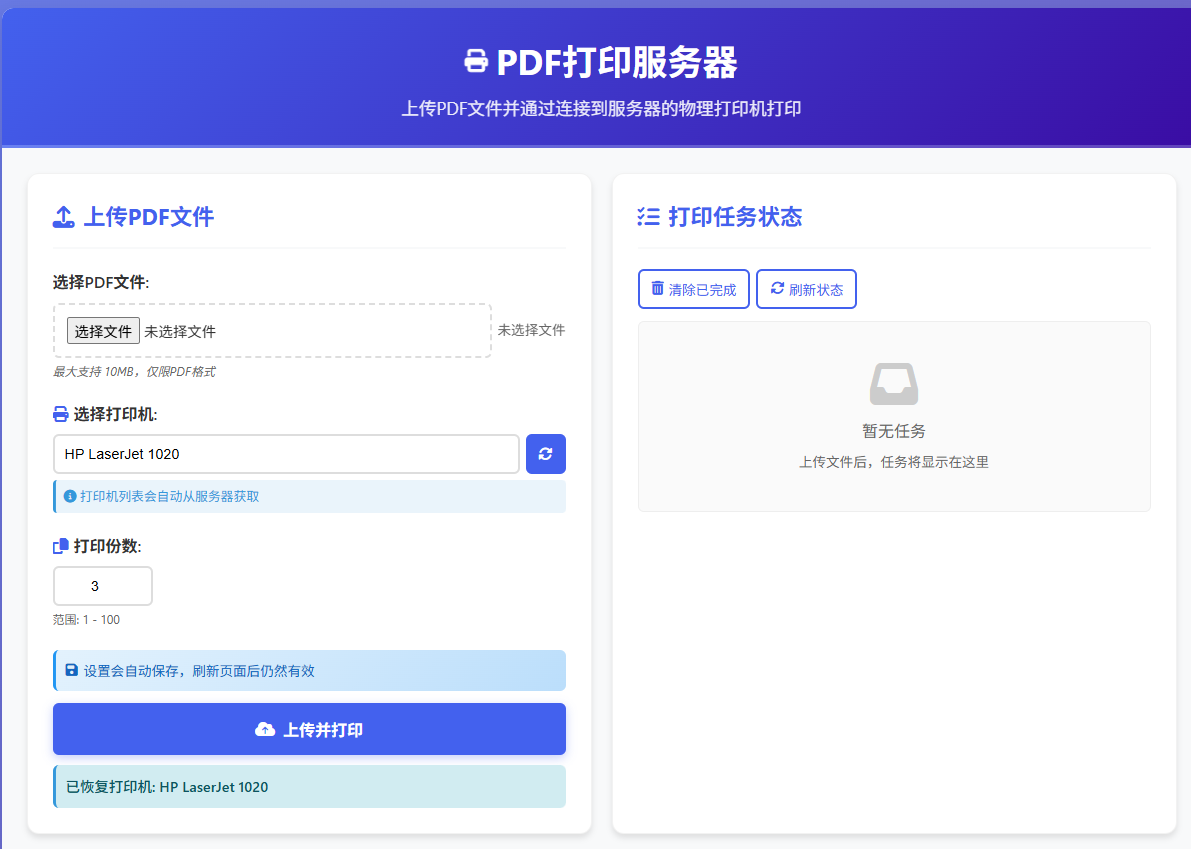
PDF打印服务器
一个基于FastAPI的PDF打印服务器,支持通过网页界面上传PDF文件并打印到局域网内的物理打印机。
功能特性
-
📄 支持PDF文件上传和打印
-
🖨️ 自动检测系统打印机列表
-
📱 响应式设计,支持移动端和桌面端
-
🔄 实时打印任务状态监控
-
💾 自动保存用户设置(打印机、打印份数)
-
🔒 安全的文件处理,临时文件自动清理
-
🌐 支持局域网多设备访问
-
🎯 可靠的打印份数控制(支持1-100份)
系统要求
操作系统
-
Windows 10/11 (推荐,功能最完整)
软件依赖
-
Python 3.8+
-
SumatraPDF (Windows用户必需)
-
系统打印机驱动
安装步骤
1. 安装Python依赖
pip install fastapi uvicorn psutil
Windows用户额外安装:
pip install pywin32
2. 安装SumatraPDF (仅Windows)
-
下载SumatraPDF:https://www.sumatrapdfreader.org/download-free-pdf-viewer.html
-
安装到默认路径:
C:Program FilesSumatraPDF
3. 克隆或下载代码
git clone https://github.com/yourusername/pdf-print-server.git
cd pdf-print-server
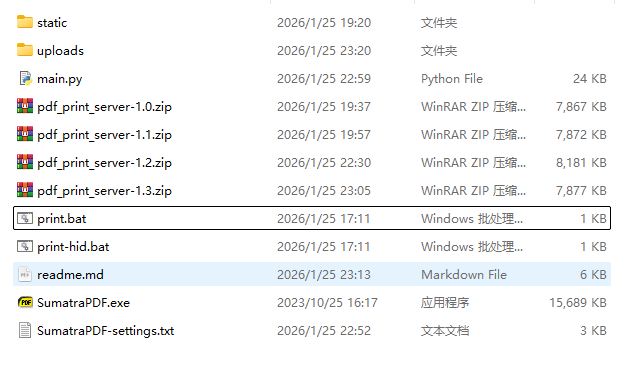
4. 创建必要的目录结构
pdf-print-server/
├── uploads/          # 自动创建,用于临时存储上传的文件
├── static/           # 前端静态文件
│   └── index.html   # 前端页面
└── server.py        # 后端服务器代码
使用方法
1. 启动服务器
python server.py
服务器启动后将显示:
============================================================
PDF打印服务器启动 - SumatraPDF修复版
============================================================
本地访问: http://localhost:8083
局域网访问: http://192.168.1.100:8083
服务器地址: 192.168.1.100
系统: Windows
============================================================
2. 访问网页界面
-
在服务器本机:打开浏览器访问
http://localhost:8083 -
在局域网其他设备:打开浏览器访问
http://服务器IP:8083
3. 使用流程
-
选择PDF文件:点击"选择PDF文件"按钮或拖放文件到区域
-
选择打印机:从下拉列表中选择要使用的打印机
-
设置打印份数:输入需要打印的份数(1-100)
-
开始打印:点击"上传并打印"按钮
-
查看状态:在右侧任务状态区域查看打印进度
API接口
主要接口
| 端点 | 方法 | 描述 |
|---|---|---|
/ | GET | 前端页面 |
/api/printers | GET | 获取打印机列表 |
/api/upload | POST | 上传并打印PDF文件 |
/api/tasks | GET | 获取所有任务状态 |
/api/tasks/{task_id} | GET | 获取特定任务状态 |
/api/health | GET | 服务器健康检查 |
/api/sumatra-test | GET | 测试SumatraPDF安装 |
上传文件参数
curl -X POST http://localhost:8083/api/upload
  -F "file=@document.pdf"
  -F "printer=HP LaserJet"
  -F "copies=2"
配置文件说明
服务器配置
在 server.py 中可以修改以下配置:
# 端口配置 PORT = 8083 # 默认端口 # 文件上传限制 MAX_FILE_SIZE = 10 * 1024 * 1024 # 10MB # 临时文件清理 FILE_CLEANUP_HOURS = 1 # 1小时后清理临时文件
前端配置
前端设置自动保存在浏览器的LocalStorage中:
-
选择的打印机
-
打印份数
-
刷新页面后设置保持不变
故障排除
常见问题
1. 打印机列表为空
-
检查打印机是否已连接并安装驱动
-
Windows:确保打印机已设置为"默认打印机"
-
Linux:确保CUPS服务正在运行
2. 打印失败
-
Windows:检查SumatraPDF是否正确安装
-
查看服务器控制台日志获取详细错误信息
-
确保PDF文件没有损坏
3. 打印份数不起作用
-
Windows:确认SumatraPDF版本支持
-print-settings "Nx"参数 -
尝试使用打印对话框方案
4. 无法访问网页
-
检查防火墙设置,确保8083端口开放
-
确保服务器和客户端在同一局域网
日志查看
服务器日志包含详细的操作信息:
-
文件上传状态
-
打印命令执行情况
-
错误信息
安全注意事项
-
文件安全:上传的文件会存储在临时目录,打印完成后自动删除
-
访问控制:当前版本无认证,建议在内网安全环境使用
-
文件大小限制:默认限制为10MB,防止大文件攻击
-
端口安全:建议在路由器中限制8083端口的访问
开发说明
项目结构
pdf-print-server/
├── server.py              # FastAPI后端服务器
├── static/
│   ├── index.html        # 前端HTML页面
│   └── (CSS/JS内联)      # 样式和脚本
├── uploads/              # 临时文件目录
├── requirements.txt      # Python依赖
└── README.md            # 项目说明
更新日志
v1.3.0 (最新)
-
根据SumatraPDF官方文档修正打印份数设置
-
增加打印对话框备用方案
-
增强错误处理和日志记录
-
新增SumatraPDF测试接口
v1.2.0
-
修复移动端显示问题
-
添加异步任务处理
-
改进打印份数备用方案
-
增加系统健康检查
v1.1.0
-
添加设置自动保存功能
-
优化移动端用户体验
-
改进打印机列表获取
v1.0.0
-
初始版本发布
-
基本PDF上传和打印功能
-
打印机列表自动检测
-
任务状态监控
v1.3.0 (最新) 最新代码 index.html
PDF打印服务器
PDF打印服务器
上传PDF文件并通过连接到服务器的物理打印机打印
移动端优化版本
上传PDF文件
未选择文件
最大支持 10MB,仅限PDF格式
点击选择文件
打印机列表会自动从服务器获取
点击下拉选择打印机
范围: 1 - 100
设置会自动保存,刷新页面后仍然有效
打印任务状态
暂无任务
上传文件后,任务将显示在这里
可以上下滚动查看任务列表
使用说明
- 确保您的设备与服务器在同一局域网中
- 选择要打印的PDF文件(最大10MB)
- 选择连接到服务器的打印机
- 设置打印份数(1-100)
- 点击"上传并打印"按钮
- 打印完成后,临时文件会自动删除
服务器地址:
获取中...
系统:
检测中...
打印机状态:
未知
设置管理
您的打印设置(打印机和份数)会自动保存到浏览器中,刷新页面后仍然有效。
常见问题解决
- Windows用户: 请确保已安装SumatraPDF,或修改代码使用其他PDF打印工具
- 打印机未列出: 确保打印机已连接并安装驱动
- 打印失败: 检查控制台日志,确认打印机状态
- 设置不保存: 检查浏览器是否禁用了localStorage
FastApi代码:
import os
import uuid
import subprocess
import platform
import logging
import time
from fastapi import FastAPI, UploadFile, File, Form, HTTPException
from fastapi.responses import HTMLResponse, JSONResponse
from fastapi.staticfiles import StaticFiles
from pathlib import Path
from typing import Optional
import uvicorn
import sys
from concurrent.futures import ThreadPoolExecutor
import threading
# 配置日志
logging.basicConfig(level=logging.INFO, format='%(asctime)s - %(levelname)s - %(message)s')
logger = logging.getLogger(__name__)
app = FastAPI(title="PDF打印服务器", version="1.3.0")
# 创建必要的目录
UPLOAD_DIR = Path("uploads")
UPLOAD_DIR.mkdir(exist_ok=True)
# 挂载静态文件目录
app.mount("/static", StaticFiles(directory="static"), name="static")
# 全局状态存储任务信息
tasks = {}
task_lock = threading.Lock()
# 线程池用于异步执行打印任务
executor = ThreadPoolExecutor(max_workers=3)
def get_system_printers():
"""获取系统可用的打印机列表"""
system = platform.system()
printers = []
try:
if system == "Windows":
import win32print
# 获取本地打印机
printers_info = win32print.EnumPrinters(win32print.PRINTER_ENUM_LOCAL)
printers = [p[2] for p in printers_info]
# 获取网络打印机(如果需要)
try:
network_printers = win32print.EnumPrinters(win32print.PRINTER_ENUM_CONNECTIONS)
network_printer_names = [p[2] for p in network_printers]
printers.extend(network_printer_names)
except:
pass
elif system == "Linux":
# 使用lpstat命令获取打印机
result = subprocess.run(["lpstat", "-p"], capture_output=True, text=True, timeout=5)
for line in result.stdout.splitlines():
if line.startswith("printer"):
printer_name = line.split()[1]
# 移除"打印机状态"等后缀
if "disabled" in line:
printer_name = printer_name + " (已禁用)"
printers.append(printer_name)
elif system == "Darwin": # macOS
result = subprocess.run(["lpstat", "-p"], capture_output=True, text=True, timeout=5)
for line in result.stdout.splitlines():
if "printer" in line:
printer_name = line.split()[1]
printers.append(printer_name)
except Exception as e:
logger.error(f"获取打印机列表失败: {e}")
# 返回默认选项
return ["默认打印机"]
# 去重并排序
printers = sorted(list(set(printers)))
# 如果没有找到打印机,添加默认选项
if not printers:
printers = ["默认打印机"]
return printers
def print_pdf(file_path: str, printer_name: str = None, copies: int = 1):
"""打印PDF文件 - 根据官方文档修复打印份数设置"""
system = platform.system()
file_path = str(file_path)
logger.info(f"开始打印: 文件={file_path}, 打印机={printer_name}, 份数={copies}")
try:
if system == "Windows":
# 检查SumatraPDF是否存在
sumatra_paths = [
"SumatraPDF.exe", # 如果在PATH中
r"C:Program FilesSumatraPDFSumatraPDF.exe",
r"C:Program Files (x86)SumatraPDFSumatraPDF.exe",
r"C:UsersPublicDownloadsSumatraPDF.exe"
]
sumatra_exe = None
for path in sumatra_paths:
if os.path.exists(path):
sumatra_exe = path
break
if not sumatra_exe:
raise Exception("SumatraPDF未找到,请先安装SumatraPDF")
# 构建打印命令
cmd = [sumatra_exe]
# 处理打印机名称
if printer_name and printer_name != "默认打印机":
# 清理打印机名称,移除可能的状态后缀
clean_printer_name = printer_name.split(" (")[0]
cmd.extend(["-print-to", clean_printer_name])
logger.info(f"使用指定打印机: {clean_printer_name}")
else:
# 使用默认打印机
cmd.extend(["-print-to-default"])
logger.info("使用默认打印机")
# 根据官方文档修复打印份数设置
# -print-settings "3x" 表示打印3份
if copies > 1:
cmd.extend(["-print-settings", f"{copies}x"])
logger.info(f"设置打印份数: {copies}x")
# 静默模式,不显示错误信息
cmd.append("-silent")
# 添加文件路径
cmd.append(file_path)
logger.info(f"执行打印命令: {' '.join(cmd)}")
# 执行打印
result = subprocess.run(cmd, capture_output=True, text=True, timeout=60)
if result.returncode == 0:
logger.info(f"打印命令执行成功,份数: {copies}")
return True
else:
error_msg = result.stderr or result.stdout
logger.error(f"打印失败: {error_msg}")
# 尝试备用方案:使用print-dialog显示打印对话框
logger.info(f"尝试备用方案:显示打印对话框")
dialog_cmd = [sumatra_exe, "-print-dialog", "-exit-when-done", file_path]
try:
dialog_result = subprocess.run(dialog_cmd, capture_output=True, text=True, timeout=30)
if dialog_result.returncode == 0:
logger.info(f"打印对话框方案成功")
return True
else:
raise Exception(f"打印对话框也失败: {dialog_result.stderr}")
except Exception as dialog_error:
logger.error(f"打印对话框方案失败: {dialog_error}")
# 最终方案:多次调用打印命令
if copies > 1:
logger.info(f"尝试最终方案:分{copies}次打印")
success_count = 0
for i in range(copies):
try:
logger.info(f"打印第 {i+1}/{copies} 份")
single_copy_cmd = cmd.copy()
# 移除份数设置,只打印1份
if f"{copies}x" in single_copy_cmd:
idx = single_copy_cmd.index(f"{copies}x")
single_copy_cmd.pop(idx-1) # 移除-print-settings
single_copy_cmd.pop(idx-1) # 移除份数值
retry_result = subprocess.run(single_copy_cmd, capture_output=True, text=True, timeout=30)
if retry_result.returncode == 0:
success_count += 1
time.sleep(2) # 每次打印间隔2秒,避免打印机过载
else:
logger.warning(f"第 {i+1} 份打印失败")
except Exception as e:
logger.warning(f"第 {i+1} 份打印异常: {e}")
if success_count > 0:
logger.info(f"最终方案成功打印 {success_count}/{copies} 份")
return True
else:
raise Exception(f"所有打印尝试都失败: {error_msg}")
else:
raise Exception(f"打印失败: {error_msg}")
elif system == "Linux":
# Linux系统使用lp命令
cmd = ["lp", "-n", str(copies)]
if printer_name and printer_name != "默认打印机":
# 清理打印机名称
clean_printer_name = printer_name.split(" (")[0]
cmd.extend(["-d", clean_printer_name])
logger.info(f"使用指定打印机: {clean_printer_name}")
else:
logger.info("使用默认打印机")
cmd.append(file_path)
logger.info(f"执行命令: {' '.join(cmd)}")
result = subprocess.run(cmd, capture_output=True, text=True, timeout=60)
if result.returncode == 0:
logger.info(f"打印任务已提交,份数: {copies}")
return True
else:
error_msg = result.stderr or result.stdout
logger.error(f"打印失败: {error_msg}")
raise Exception(f"打印失败: {error_msg}")
elif system == "Darwin": # macOS
# macOS也使用lp命令
cmd = ["lp", "-n", str(copies)]
if printer_name and printer_name != "默认打印机":
# 清理打印机名称
clean_printer_name = printer_name.split(" (")[0]
cmd.extend(["-d", clean_printer_name])
logger.info(f"使用指定打印机: {clean_printer_name}")
else:
logger.info("使用默认打印机")
cmd.append(file_path)
logger.info(f"执行命令: {' '.join(cmd)}")
result = subprocess.run(cmd, capture_output=True, text=True, timeout=60)
if result.returncode == 0:
logger.info(f"打印任务已提交,份数: {copies}")
return True
else:
error_msg = result.stderr or result.stdout
logger.error(f"打印失败: {error_msg}")
raise Exception(f"打印失败: {error_msg}")
except subprocess.TimeoutExpired:
logger.error("打印命令执行超时")
raise Exception("打印命令执行超时,请检查打印机状态")
except Exception as e:
logger.error(f"打印异常: {e}")
raise
def process_print_task(task_id: str, file_path: Path, printer: str, copies: int, original_filename: str):
"""异步处理打印任务"""
try:
logger.info(f"开始处理打印任务 {task_id}, 份数: {copies}")
# 更新任务状态为处理中
with task_lock:
tasks[task_id]["status"] = "processing"
tasks[task_id]["started_at"] = time.strftime("%H:%M:%S")
# 打印文件
success = print_pdf(file_path, printer, copies)
# 更新任务状态
with task_lock:
if success:
tasks[task_id]["status"] = "completed"
tasks[task_id]["copies_printed"] = copies
else:
tasks[task_id]["status"] = "failed"
tasks[task_id]["copies_printed"] = 0
tasks[task_id]["completed_at"] = time.strftime("%H:%M:%S")
tasks[task_id]["success"] = success
# 打印完成后删除文件
if os.path.exists(file_path):
try:
os.remove(file_path)
logger.info(f"临时文件已删除: {file_path}")
except Exception as e:
logger.warning(f"删除临时文件失败: {e}")
logger.info(f"打印任务 {task_id} 完成,状态: {'成功' if success else '失败'}")
except Exception as e:
logger.error(f"处理打印任务失败: {e}")
with task_lock:
tasks[task_id]["status"] = "failed"
tasks[task_id]["error"] = str(e)
tasks[task_id]["completed_at"] = time.strftime("%H:%M:%S")
tasks[task_id]["copies_printed"] = 0
# 确保清理临时文件
if os.path.exists(file_path):
try:
os.remove(file_path)
logger.info(f"清理临时文件: {file_path}")
except:
pass
@app.get("/", response_class=HTMLResponse)
async def root():
"""返回主页面"""
try:
with open("static/index.html", "r", encoding="utf-8") as f:
return HTMLResponse(content=f.read(), status_code=200)
except FileNotFoundError:
# 如果静态文件不存在,返回一个简单的重定向页面
return HTMLResponse(content="""
PDF打印服务器
PDF打印服务器
静态文件目录未找到
请确保已经创建了 static/index.html 文件
或者直接使用API接口:
- GET /api/printers - 获取打印机列表
- POST /api/upload - 上传并打印PDF
- GET /api/health - 服务器健康检查
""", status_code=404)
@app.get("/api/printers")
async def get_printers():
"""获取可用打印机列表"""
try:
printers = get_system_printers()
logger.info(f"获取到打印机列表: {printers}")
return {
"printers": printers,
"count": len(printers),
"system": platform.system(),
"sumatra_supported": platform.system() == "Windows"
}
except Exception as e:
logger.error(f"获取打印机列表失败: {e}")
return {
"printers": ["默认打印机"],
"error": str(e),
"system": platform.system()
}
@app.post("/api/upload")
async def upload_pdf(
file: UploadFile = File(..., description="PDF文件"),
printer: Optional[str] = Form(None),
copies: int = Form(1, ge=1, le=100)
):
"""上传PDF文件并添加到打印队列"""
# 验证文件类型
if not file.filename:
raise HTTPException(status_code=400, detail="未选择文件")
if not file.filename.lower().endswith(".pdf"):
raise HTTPException(status_code=400, detail="只支持PDF文件,请上传PDF格式文件")
# 验证文件大小
content = await file.read()
file_size = len(content)
if file_size > 10 * 1024 * 1024: # 10MB限制
raise HTTPException(status_code=400, detail="文件大小不能超过10MB")
# 重置文件指针以便再次读取
await file.seek(0)
# 保存文件
filename = f"{uuid.uuid4().hex}.pdf"
file_path = UPLOAD_DIR / filename
try:
with open(file_path, "wb") as f:
content = await file.read()
f.write(content)
logger.info(f"文件已保存: {file_path}, 原始文件名: {file.filename}, 大小: {file_size}字节, 份数: {copies}")
# 创建任务ID
task_id = uuid.uuid4().hex
with task_lock:
tasks[task_id] = {
"id": task_id,
"status": "queued",
"filename": file.filename,
"printer": printer or "默认打印机",
"copies": copies,
"file_size": file_size,
"created_at": time.strftime("%Y-%m-%d %H:%M:%S"),
"original_filename": file.filename
}
# 异步执行打印任务
executor.submit(process_print_task, task_id, file_path, printer, copies, file.filename)
return {
"task_id": task_id,
"status": "queued",
"filename": file.filename,
"printer": printer or "默认打印机",
"copies": copies,
"message": f"文件已上传,正在排队打印 {copies} 份"
}
except Exception as e:
logger.error(f"处理上传文件失败: {e}")
# 确保清理临时文件
if os.path.exists(file_path):
try:
os.remove(file_path)
except:
pass
raise HTTPException(status_code=500, detail=f"处理文件失败: {str(e)}")
@app.get("/api/tasks/{task_id}")
async def get_task_status(task_id: str):
"""获取任务状态"""
if task_id not in tasks:
raise HTTPException(status_code=404, detail="任务不存在")
with task_lock:
task_info = tasks[task_id].copy()
return task_info
@app.get("/api/tasks")
async def get_all_tasks():
"""获取所有任务"""
with task_lock:
# 返回最近的任务,按创建时间倒序
all_tasks = list(tasks.values())
sorted_tasks = sorted(all_tasks, key=lambda x: x.get("created_at", ""), reverse=True)
return {
"tasks": sorted_tasks,
"total": len(sorted_tasks),
"queued": len([t for t in sorted_tasks if t.get("status") == "queued"]),
"processing": len([t for t in sorted_tasks if t.get("status") == "processing"]),
"completed": len([t for t in sorted_tasks if t.get("status") == "completed"]),
"failed": len([t for t in sorted_tasks if t.get("status") == "failed"])
}
@app.delete("/api/tasks/{task_id}")
async def delete_task(task_id: str):
"""删除任务"""
with task_lock:
if task_id in tasks:
del tasks[task_id]
return {"message": "任务已删除", "task_id": task_id}
else:
raise HTTPException(status_code=404, detail="任务不存在")
@app.delete("/api/tasks")
async def clear_completed_tasks():
"""清除已完成和失败的任务"""
with task_lock:
tasks_to_delete = []
for task_id, task_info in list(tasks.items()):
if task_info.get("status") in ["completed", "failed"]:
tasks_to_delete.append(task_id)
for task_id in tasks_to_delete:
del tasks[task_id]
return {
"message": f"已清除 {len(tasks_to_delete)} 个任务",
"cleared": tasks_to_delete,
"remaining": len(tasks)
}
@app.get("/api/health")
async def health_check():
"""健康检查端点"""
try:
# 测试打印机列表获取
printers = get_system_printers()
# 检查上传目录
upload_dir_exists = UPLOAD_DIR.exists()
# 检查目录写入权限
test_file = UPLOAD_DIR / ".test_write"
try:
test_file.touch()
can_write = True
test_file.unlink()
except:
can_write = False
# 检查SumatraPDF是否存在(仅Windows)
sumatra_exists = False
if platform.system() == "Windows":
sumatra_paths = [
"SumatraPDF.exe",
r"C:Program FilesSumatraPDFSumatraPDF.exe",
r"C:Program Files (x86)SumatraPDFSumatraPDF.exe",
]
for path in sumatra_paths:
if os.path.exists(path):
sumatra_exists = True
break
return {
"status": "healthy",
"system": platform.system(),
"python_version": sys.version.split()[0],
"upload_dir_exists": upload_dir_exists,
"can_write": can_write,
"printers_count": len(printers),
"tasks_count": len(tasks),
"sumatra_installed": sumatra_exists,
"server_time": time.strftime("%Y-%m-%d %H:%M:%S"),
"version": "1.3.0",
"features": {
"copies_support": True,
"async_printing": True,
"multiple_fallback": True
}
}
except Exception as e:
return {
"status": "error",
"error": str(e),
"system": platform.system()
}
@app.get("/api/sumatra-test")
async def test_sumatra():
"""测试SumatraPDF安装和配置"""
if platform.system() != "Windows":
return {"supported": False, "message": "此功能仅支持Windows系统"}
try:
sumatra_paths = [
"SumatraPDF.exe",
r"C:Program FilesSumatraPDFSumatraPDF.exe",
r"C:Program Files (x86)SumatraPDFSumatraPDF.exe",
]
sumatra_exe = None
for path in sumatra_paths:
if os.path.exists(path):
sumatra_exe = path
break
if not sumatra_exe:
return {
"installed": False,
"message": "SumatraPDF未安装",
"download_url": "https://www.sumatrapdfreader.org/download-free-pdf-viewer.html"
}
# 测试版本
result = subprocess.run([sumatra_exe, "-version"], capture_output=True, text=True, timeout=5)
return {
"installed": True,
"path": sumatra_exe,
"version": result.stdout.strip() if result.returncode == 0 else "未知版本",
"print_options": {
"copies": "使用 -print-settings 'Nx' 格式,如 '3x' 表示3份",
"printer": "使用 -print-to '打印机名称' 或 -print-to-default",
"silent": "-silent 参数用于静默打印",
"dialog": "-print-dialog -exit-when-done 用于显示打印对话框"
}
}
except Exception as e:
return {"installed": False, "error": str(e)}
if __name__ == "__main__":
# 获取本地IP地址
import socket
try:
hostname = socket.gethostname()
local_ip = socket.gethostbyname(hostname)
except:
local_ip = "127.0.0.1"
print("=" * 60)
print("PDF打印服务器启动 - SumatraPDF修复版")
print("=" * 60)
print(f"本地访问: http://localhost:8083")
print(f"局域网访问: http://{local_ip}:8083")
print(f"服务器地址: {local_ip}")
print(f"系统: {platform.system()}")
print("=" * 60)
print("重要更新:")
print("1. 根据官方文档修复打印份数设置: -print-settings 'Nx'")
print("2. 新增打印对话框备用方案")
print("3. 增加SumatraPDF测试接口")
print("=" * 60)
print("SumatraPDF打印选项:")
print(" -print-to '打印机名' # 指定打印机")
print(" -print-to-default # 默认打印机")
print(" -print-settings '3x' # 打印3份 (根据文档)")
print(" -silent # 静默模式")
print(" -print-dialog # 显示打印对话框")
print("=" * 60)
# 确保uploads目录存在
UPLOAD_DIR.mkdir(exist_ok=True)
# 清理旧的临时文件(超过1小时)
try:
now = time.time()
for file in UPLOAD_DIR.glob("*.pdf"):
if now - file.stat().st_mtime > 3600: # 1小时
file.unlink()
logger.info(f"清理旧文件: {file}")
except Exception as e:
logger.warning(f"清理旧文件失败: {e}")
uvicorn.run(app, host="0.0.0.0", port=8083, log_level="info")