SpringAI 使用OpenAI连接xinference
ollama本地部署不支持重排序模型。可以使用 xinference 部署
springai 使用版本
版本介绍
其他SpringAI模型使用文档
Ollama(OpenAi)
vllm(openAi)
ollama
目录
1、安装
2、使用
2.1 基础对话使用
2.2 向量模型
2.3 重排序模型
1、安装
安装xinference 可查看文档
https://blog.csdn.net/weixin_45948519/article/details/157299712?spm=1011.2415.3001.5331
2、使用
以下是支持的 OpenAI 的 API:
-
对话生成:https://platform.openai.com/docs/api-reference/chat
-
生成: https://platform.openai.com/docs/api-reference/completions
-
向量生成:https://platform.openai.com/docs/api-reference/embeddings
-
其他模型接口文档地址
-
https://inference.readthedocs.io/zh-cn/latest/models/model_abilities/index.html
2.1 基础对话使用
-
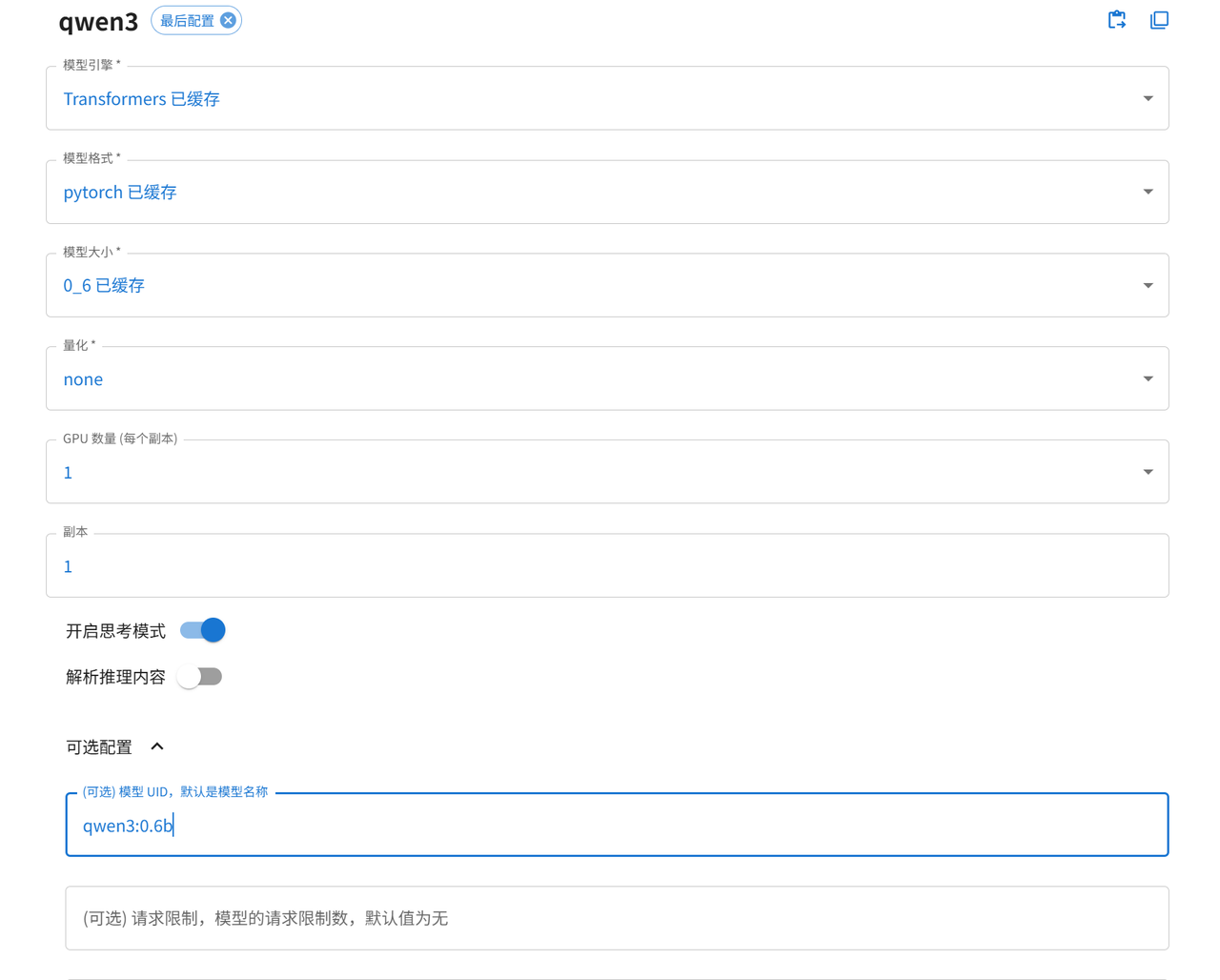
创建一个0.6b的模型进行测试 uid 模型名字为qwen3:0.6b
-
引入openai依赖
    org.springframework.ai
    spring-ai-starter-model-openai
- 配置文件配置 这里使用自动注入
# openai api key 不可以不填 目前测试随便填写字符串
spring.ai.openai.api-key=test
# Xinference 部署地址
spring.ai.openai.base-url=http://127.0.0.1:9997
# Xinference 启动的模型名称
spring.ai.openai.chat.options.model=qwen3:0.6b-
bean配置强制指定http为1.1
public HttpClient httpClient() {
    return HttpClient.newBuilder()
            // 强制使用HTTP/1.1协议
            .version(HttpClient.Version.HTTP_1_1)
            .build();
}

public WebClient.Builder webClient() {
    return WebClient.builder().clientConnector(new JdkClientHttpConnector(httpClient()));
}

public RestClient.Builder restClient() {
    return RestClient.builder().requestFactory(new JdkClientHttpRequestFactory(httpClient()));
}

/**
 * 创建对话模型
 */
@Bean
public OpenAiApi openAiApi(OpenAiConnectionProperties commonProperties,
                           OpenAiChatProperties chatProperties,
                           ResponseErrorHandler responseErrorHandler) {
    OpenAIAutoConfigurationUtil.ResolvedConnectionProperties resolved = OpenAIAutoConfigurationUtil
            .resolveConnectionProperties(commonProperties, chatProperties, "chat");
    return OpenAiApi.builder()
            .baseUrl(resolved.baseUrl())
            .apiKey(new SimpleApiKey(resolved.apiKey()))
            .headers(resolved.headers())
            .completionsPath(chatProperties.getCompletionsPath())
            .embeddingsPath("/v1/embeddings")
            .restClientBuilder(restClient())
            .webClientBuilder(webClient())
            .responseErrorHandler(responseErrorHandler).build();
}-
基础对话使用 思考模式关闭 xinference 官方API是支持的,但是openAI里面不支持
private final OpenAiChatModel xinferenceOpenAiChatModel;
/**
* 对话
*/
@GetMapping("/chat")
public String chat(@RequestParam("question") String question,
@RequestParam(name = "think", defaultValue = "true") Boolean think) {
question += think ? "" : "/no_think";
return xinferenceOpenAiChatModel.call(question);
}
/**
* 自定义参数
*/
@GetMapping("/chat/customize")
public Map chatCustomize(@RequestParam("question") String question,
@RequestParam(name = "think", defaultValue = "true") Boolean think) {
question += think ? "" : "/no_think";
ChatResponse chatResponse = xinferenceOpenAiChatModel.call(new Prompt(
question,
OpenAiChatOptions.builder().build()
));
//xinference openai不支持思考模式 官方示例通过 String thinking = response.getResult().getMetadata().get("reasoningContent"); 获取
String thinking = "";
String answer = "";
String text = chatResponse.getResult().getOutput().getText();
if (text != null) {
int thinkStart = text.indexOf("");
int thinkEnd = text.indexOf(" ");
if (thinkStart != -1 && thinkEnd != -1 && thinkEnd > thinkStart) {
thinking = text.substring(thinkStart + 7, thinkEnd);
answer = text.substring(thinkEnd + 8);
} else {
answer = text;
}
}
log.info("思考内容: {}", thinking);
log.info("回答: {}", answer);
return Map.of("thinking", thinking, "answer", answer);
}
/**
* 流式对话
*/
@GetMapping("/chat/stream")
public Flux chatStream(@RequestParam("question") String question,
@RequestParam(name = "think", defaultValue = "true") Boolean think) {
question += think ? "" : "/no_think";
return xinferenceOpenAiChatModel.stream(question);
}
/**
* 多模态 图片识别
*/
@PostMapping(value = "/multimodal", consumes = MediaType.MULTIPART_FORM_DATA_VALUE)
public String multimodal(@RequestParam("file") MultipartFile file,
@RequestParam(value = "question", defaultValue = "识别这张图片的内容") String question) throws Exception {
String contentType = file.getContentType() == null ? MimeTypeUtils.APPLICATION_OCTET_STREAM_VALUE : file.getContentType();
Resource imageResource = new InputStreamResource(file.getInputStream()) {
@Override
public String getFilename() {
return file.getOriginalFilename();
}
};
UserMessage userMessage = UserMessage.builder()
.media(new Media(MediaType.parseMediaType(contentType), imageResource))
.text(question)
.build();
ChatResponse response = xinferenceOpenAiChatModel.call(
new Prompt(userMessage, OpenAiChatOptions.builder()
.model("gemma-3-it")
.temperature(0.7)
.build())
);
return response.getResult().getOutput().getText();
}
2.2 向量模型
-
准备一个向量模型

-
配置
# 配置 embedding 模型名称
spring.ai.openai.embedding.options.model=Qwen3-Embedding-0.6B-
配置http1.1
public HttpClient httpClient() {
    return HttpClient.newBuilder()
            // 强制使用HTTP/1.1协议
            .version(HttpClient.Version.HTTP_1_1)
            .build();
}

public WebClient.Builder webClient() {
    return WebClient.builder().clientConnector(new JdkClientHttpConnector(httpClient()));
}

public RestClient.Builder restClient() {
    return RestClient.builder().requestFactory(new JdkClientHttpRequestFactory(httpClient()));
}

/**
 * 创建向量模型
 */
@Bean
public OpenAiEmbeddingModel openAiEmbeddingModel(OpenAiConnectionProperties commonProperties,
                                                 OpenAiEmbeddingProperties embeddingProperties,
                                                 RetryTemplate retryTemplate,
                                                 ResponseErrorHandler responseErrorHandler,
                                                 ObjectProvider observationRegistry,
                                                 ObjectProvider observationConvention) {
    OpenAIAutoConfigurationUtil.ResolvedConnectionProperties resolved = OpenAIAutoConfigurationUtil
            .resolveConnectionProperties(commonProperties, embeddingProperties, "embedding");
    OpenAiApi openAiApi = OpenAiApi.builder()
            .baseUrl(resolved.baseUrl())
            .apiKey(new SimpleApiKey(resolved.apiKey()))
            .headers(resolved.headers())
            .completionsPath("/v1/chat/completions")
            .embeddingsPath(embeddingProperties.getEmbeddingsPath())
            .restClientBuilder(restClient())
            .webClientBuilder(webClient())
            .responseErrorHandler(responseErrorHandler)
            .build();
    OpenAiEmbeddingModel embeddingModel = new OpenAiEmbeddingModel(openAiApi, embeddingProperties.getMetadataMode(), embeddingProperties.getOptions(), retryTemplate, (ObservationRegistry) observationRegistry.getIfUnique(() -> ObservationRegistry.NOOP));
    Objects.requireNonNull(embeddingModel);
    observationConvention.ifAvailable(embeddingModel::setObservationConvention);
    return embeddingModel;
} -
使用
private final OpenAiEmbeddingModel xinferenceOpenAiEmbeddingModel;

@GetMapping("embedding")
public float[] embedding(@RequestParam("text") String text) {
    return xinferenceOpenAiEmbeddingModel.embed(text);
}
2.3 重排序模型
-
这里使用官方提供的API 简单示例
-
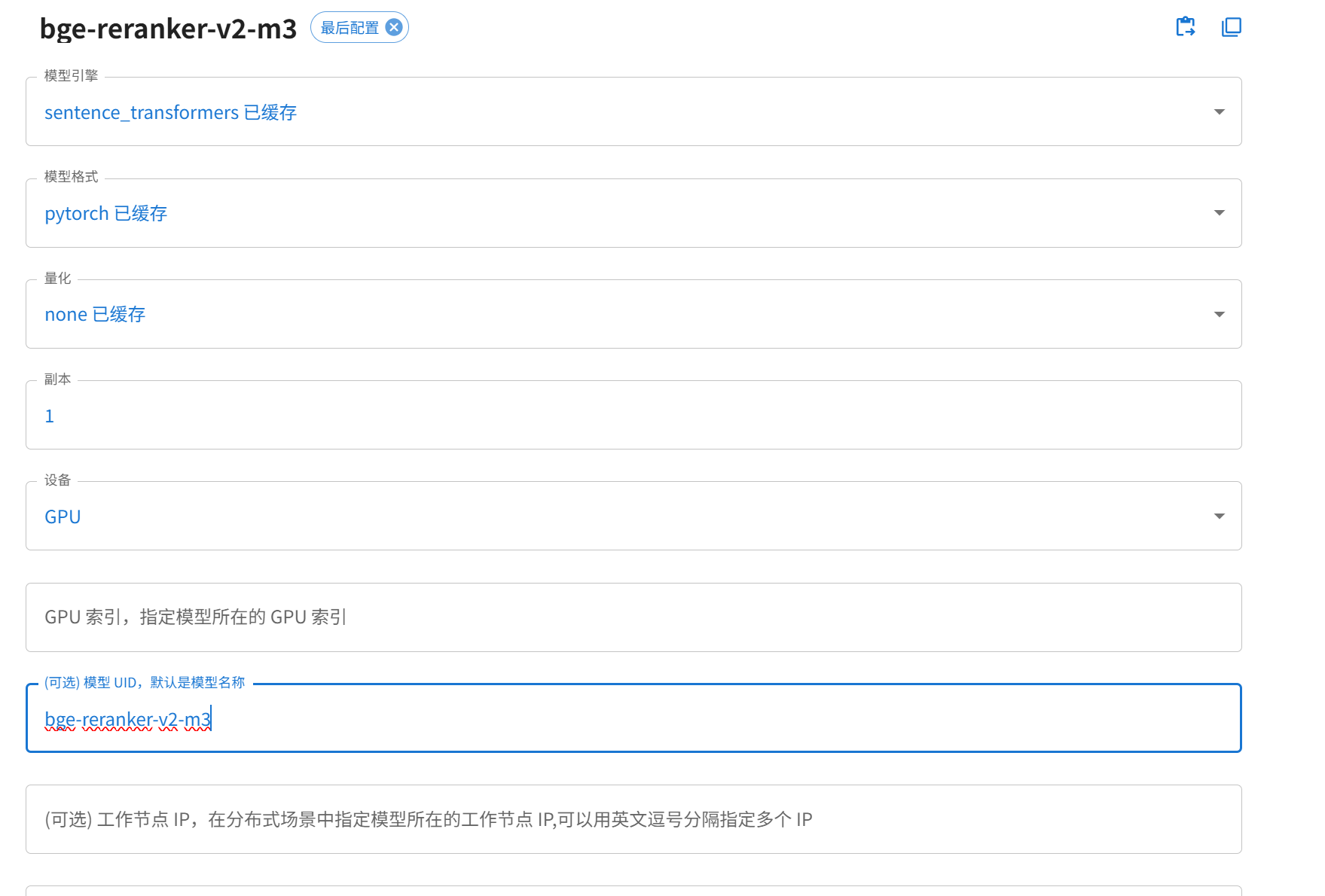
准备一个重排序模型
-
定义一个model类
@Bean
public XinferenceOtherModels xinferenceOtherModels(OpenAiConnectionProperties commonProperties) {
    RestClient restClient = RestClient.builder()
            .requestFactory(new JdkClientHttpRequestFactory(httpClient()))
            .baseUrl(commonProperties.getBaseUrl())
            .defaultHeader("Authorization", "Bearer " + commonProperties.getApiKey())
            .defaultHeader("accept", "application/json")
            .build();
    return new XinferenceOtherModels(restClient);
}


public static class XinferenceOtherModels {
    private final RestClient restClient;
    private final String modelName = "bge-reranker-v2-m3";

    public XinferenceOtherModels(RestClient restClient) {
        this.restClient = restClient;
    }

    /**
     * 重排序文档
     */
    public List rerankDocument(String query, List documents, Integer topK, Double score) {
        Request request = new Request(modelName, query, documents.stream().map(Document::getText).toList());
        Response body = restClient.post()
                .uri("/v1/rerank")
                .body(request)
                .retrieve()
                .body(Response.class);
        if (body != null) {
            return body.results().stream()
                    .filter(result -> result.relevance_score >= score)
                    .limit(topK)
                    .map(result -> documents.get(result.index()).mutate().score(result.relevance_score()).build())
                    .collect(Collectors.toList());
        }
        return Collections.emptyList();
    }

    @JsonInclude(JsonInclude.Include.NON_NULL)
    public record Request(
            String model,
            String query,
            List documents) {
    }

    @JsonInclude(JsonInclude.Include.NON_NULL)
    public record Response(
            String id,
            List results) {
    }

    @JsonInclude(JsonInclude.Include.NON_NULL)
    public record Result(
            Integer index,
            Double relevance_score,
            String document
    ) {
    }
} -
使用
private final OpenAiXinferenceConfig.XinferenceOtherModels xinferenceOtherModels;

@GetMapping("rerank")
public List rerank() {
    String query = "如何在Spring AI中使用Xinference重排序模型";
    List documents = List.of(
            Document.builder().text("RAG系统中重排序能提升检索结果准确性").build(),
            Document.builder().text("Java的List集合可存储文档列表").build(),
            Document.builder().text("Xinference支持部署bge-reranker重排序模型,可通过HTTP API调用").build(),
            Document.builder().text("Spring Boot的@RestController用于定义HTTP接口").build(),
            Document.builder().text("Xinference的rerank接口需要传入query和documents参数").build()
    );
    return xinferenceOtherModels.rerankDocument(query, documents, 3, 0.5d);
} -
结果

本文地址:https://www.yitenyun.com/3836.html