Python爬虫入门:一个案例教会你所有静态网页的数据爬取
文章目录
- 用到的库
- 整体架构流程
- 找到对应书
- 确定目标url
- 数据提取
- 数据入库
- 可能出现的问题
- 爬虫注意事项
用到的库
库名:
- requests
- lxml
- re (Python 内置库)
- os (Python 内置库)
安装库
pip install requests lxml
整体架构流程
- 确定目标网站:https://category.dangdang.com/cp01.01.02.00.00.00.html
- 确定目标数据:作者,出版社,书名,标价,定价,折扣(如果有就要)
- 整体流程:找到对应书->确定目标url->数据提取->数据入库->可能出现的问题
- 一些思考的操作:1.确定目标url过程中可观察url变化实现自动翻页操作爬取;2.数据提取只会xpath在今后遇到不规则网站不好办,故还可re提取数据(必会),re在今后遇到不规则的代码或jsonp数据时会变得非常好用
找到对应书
- 进入网页后,在页面中按下F12打开devtools工具集,此时按下Ctrl+Shift+R刷新页面加载数据包
- 点击放大镜进行搜索

3. 随便搜索一个我们需要提取的页面数据,这里我就以搜索第一本书的作者“安东尼”为例,搜索后按Enter发出有好几个数据包,这时我们不要着急,记住我们页面上的信息一个一个数据包点开看看并上下滑动看看里面的数据,当发现有我们页面上的其他数据时,那就基本找对了数据包。5. 静态网站数据都在源代码中,故数据都在html后缀的包中,倘若熟练,不需要搜索,直接选中Doc,列出所有对应的数据包

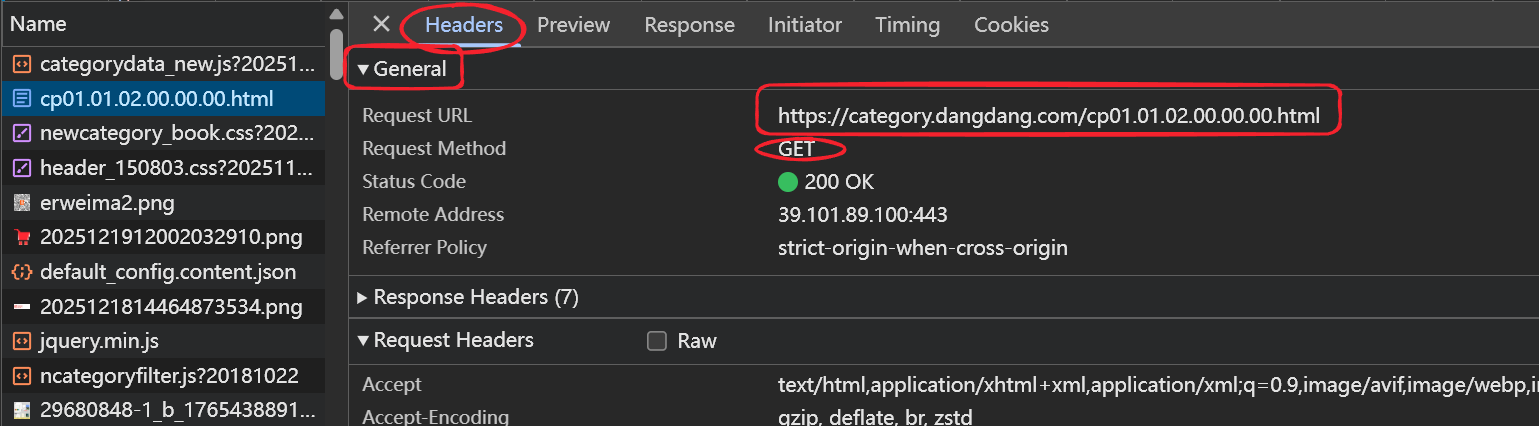
4. 此时这个数据包就是我们写代码时需要爬取的url,可以在这个数据包的Headers的General中查看,还可以查看发送的Http是哪一种请求(这里就是GET请求)
确定目标url
- 上述过程中我们仅仅只拿到了第一页数据的url,故我们可以多点几次下一页,重复上述操作找目标数据包的url,观察数据包url的变化,很快我们就能从中找到规律


- 第一页:https://category.dangdang.com/cp01.01.02.00.00.00.html
- 第二页:https://category.dangdang.com/pg2-cp01.01.02.00.00.00.html
- 第三页:https://category.dangdang.com/pg3-cp01.01.02.00.00.00.html
- 规律很明显,就是pg2-cp的数字在变化,这时我们可以通过Python来模拟翻页了
def get_dang_books_information(page):
    if page == 1:
        url = "https://category.dangdang.com/cp01.01.02.00.00.00.html"
    else:
        url = f"https://category.dangdang.com/pg{page}-cp01.01.02.00.00.00.html"
数据提取
- 首先,我们用最常用的xpath来提取数据,技巧就是找标签尽量找特殊的也就是属性值数量是唯一或全文很少的。
- 使用xpath技巧,我们通常都是找到一个数据的代码块(也就是所有数据全部放在这个代码块中),这样可以帮我们节省很多不必要的麻烦,能有效避免找错或炸不到等问题
- 根据代码的缩进很明显能看出我们要的数据就放在
-
这个代码块中

-
这个代码块中
- 写代码,拿出整个数据代码块
from lxml import etree
page = etree.HTML(resp.text)
temp_code = page.xpath("//ul[@class='bigimg']/li")
# print(len(temp_code))
- 找到每一条数据所在的html,以及所用的属性值,结合xpath写


# 获取每条数据的代码块去遍历
    for temp in temp_code:

        title = "".join(temp.xpath(".//p[@class='name']/a/text()")).strip()
        # print(title)
        price_now = "". join(temp.xpath(".//span[@class="
                                        "'search_now_price']/text()")).strip().replace("¥", "")

        re.sub(r's', '', price_now)

        price_temp = "".join(temp.xpath(".//span[@class='search_pre_price']/text()")).strip().replace("¥", "")

        num = ("".join(temp.xpath(".//span[@class='search_discount']/text()")).strip().
               replace(")", "").replace("(", ""))

        author = "".join(temp.xpath(".//p[@class='search_book_author']"
                                    "/span[1]/a//text()")).strip()

        chu = "".join(temp.xpath(".//p[@class='search_book_author']"
                                    "/span[3]/a//text()")).strip()

        if not title and not price_now and not price_temp and not num and not author:
            continue

        st = f"{author}, {chu}, {title[:10]}, {price_now}, {price_temp}, {num}"
- re如何进行数据提取呢,就拿拿作者名称举例吧
- 先准备一下页面源代码(目标拿到"安东尼"三个字)
 <span>
                                                    <a href='//search.dangdang.com/?key2=安东尼&medium=01&category_path=01.00.00.00.00.00' name='itemlist-author' dd_name='单品作者' title='安东尼'>安东尼a>
                                                span>
import re
obj = re.compile(r"title='安东尼'>(?P.*)" , re.S)
r = obj.search(html)
name = r.group('name')
print(name) # 安东尼
- 这样看re一个数据一个数据处理确实很麻烦,但re处理json或jsonp的时候就会知道有多好用了
数据入库
数据入库无非就是文件的读写操作,我就直接上源代码了
import requests
import re
from lxml import etree
import os


my_headers = {
    'user-agent': 'Mozilla/5.0 (Windows NT 10.0; Win64; x64) AppleWebKit/537.36 (KHTML, like Gecko) Chrome/127.0.0.0 Safari/537.36'
}

# 函数实现访问每一页数据的功能
def get_dang_books_information(page):
    # url中不带参数
    if page == 1:
        url = "https://category.dangdang.com/cp01.01.02.00.00.00.html"
    else:
        url = f"https://category.dangdang.com/pg{page}-cp01.01.02.00.00.00.html"
    # 打开一个文件夹
    f = open(f"./dang_books/第{page}页数据.csv", "w", encoding='utf-8')
    resp = requests.get(url, headers=my_headers)
    # print(resp.text)

    page = etree.HTML(resp.text)

    temp_code = page.xpath("//ul[@class='bigimg']/li")
    # print(len(temp_code))

    # 获取每条数据的代码块去遍历
    for temp in temp_code:

        title = "".join(temp.xpath(".//p[@class='name']/a/text()")).strip()
        # print(title)
        price_now = "". join(temp.xpath(".//span[@class="
                                        "'search_now_price']/text()")).strip().replace("¥", "")
        re.sub(r's', '', price_now)

        price_temp = "".join(temp.xpath(".//span[@class='search_pre_price']/text()")).strip().replace("¥", "")

        num = ("".join(temp.xpath(".//span[@class='search_discount']/text()")).strip().
               replace(")", "").replace("(", ""))
        author = "".join(temp.xpath(".//p[@class='search_book_author']"
                                    "/span[1]/a//text()")).strip()
        chu = "".join(temp.xpath(".//p[@class='search_book_author']"
                                    "/span[3]/a//text()")).strip()
        if not title and not price_now and not price_temp and not num and not author:
            continue
        st = f"{author}, {chu}, {title[:10]}, {price_now}, {price_temp}, {num}"
        f.write(st)
        f.write("
")
    f.close()

# 创建文件夹
if not os.path.exists("./dang_books"):
    os.makedirs("./dang_books")

# 爬取, 你感觉下面要写什么
def main():
	get_dang_books_information(1)
# 程序入口
if __name__ == '__main__':
    main()
可能出现的问题
如果拿到的页面源代码显示不正常,就是很多看不懂的字符,但又有明显的HTML结构
那可能是br造成的,给出两种解决方案
- 在你给的头中的类似于这一项 accept-encoding: gzip, deflate, br, zstd 里面将br给手动删除
- 安装一个第三方库 brotli
pip install brotli
例如代码中为什么频繁的出现 “”.join().strip()
title = "".join(temp.xpath(".//p[@class='name']/a/text()")).strip()
这可能是一个好习惯,在今后写代码中能避免一些不必要的错误,以及让数据更好的展现出来
爬虫注意事项
- 遵循Robots协议
- 尊重网站的爬虫协议,避免爬取禁止爬取的内容。
- 不得破坏网站正常运营。
- 明确爬取内容的版权与用途:仅仅只用于学习使用。