从零搭建ubuntu24.04制作随身U盘----学习笔记
版本为Ubuntu24.04---ROS2----Jazzy,系统存储在3.0U盘128GB中
1.下载ubuntu24.04桌面系统

2.下载Rufus

3.不要选错设备和引导文件,再点击开始

4.选择ISO

5.准备就绪变成绿色后,点击关闭,弹出U盘,同时找到自己电脑品牌的U盘启动顺序

6.重启电脑,进入BIOS界面,关闭安全模式,把U盘启动顺序放在第一位
我的电脑是按Delete和Esc进入BIOS界面

7.先选择第一个,回车进入

8.如图设置


9.先连接网络

10.跳过就行


11.选择对应的U盘空间,我的是126GB这个,再点击新建分区表

12.在左下角选择你的U盘

13.分配好类型和挂载,选择整个sdb,确定好引导程序的设备,再点击下一步
200MB分给VFAT,其余都分给Ext4,注意挂载点不要错,其他容量U盘也是一样分配

14.设置账户

15.设置时区

16.点击安装
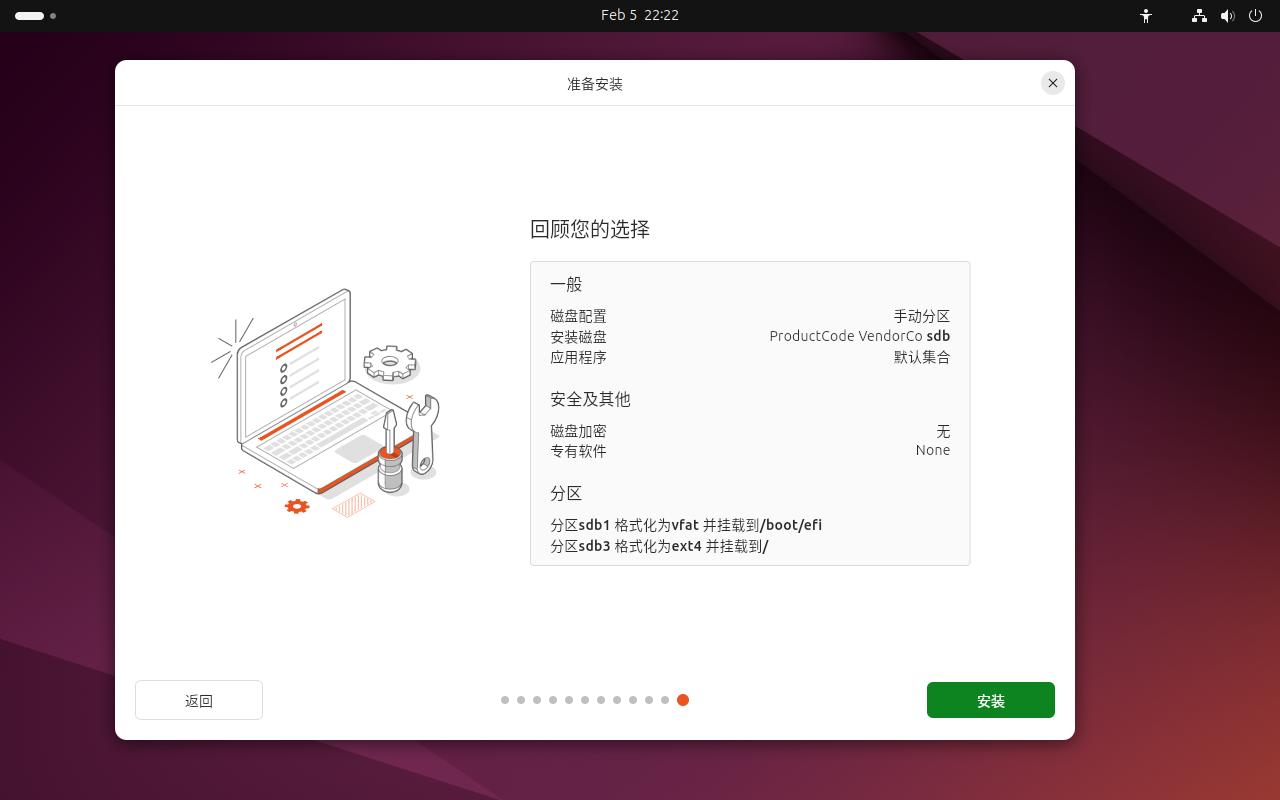
17.立即重启
18.先连接网络,打开终端进行换源,遇到输入密码时,直接输入密码按回车即可,密码不显示
第三步耗时较长,耐心等待即可
# 1. 备份原源文件
sudo cp /etc/apt/sources.list /etc/apt/sources.list.bak
# 2. 清空原源文件并写入清华源
sudo tee /etc/apt/sources.list <<-'EOF'
deb https://mirrors.tuna.tsinghua.edu.cn/ubuntu/ noble main restricted universe multiverse
deb https://mirrors.tuna.tsinghua.edu.cn/ubuntu/ noble-updates main restricted universe multiverse
deb https://mirrors.tuna.tsinghua.edu.cn/ubuntu/ noble-backports main restricted universe multiverse
deb https://mirrors.tuna.tsinghua.edu.cn/ubuntu/ noble-security main restricted universe multiverse
deb-src https://mirrors.tuna.tsinghua.edu.cn/ubuntu/ noble main restricted universe multiverse
deb-src https://mirrors.tuna.tsinghua.edu.cn/ubuntu/ noble-updates main restricted universe multiverse
deb-src https://mirrors.tuna.tsinghua.edu.cn/ubuntu/ noble-backports main restricted universe multiverse
deb-src https://mirrors.tuna.tsinghua.edu.cn/ubuntu/ noble-security main restricted universe multiverse
EOF
# 3. 更新软件源和系统包
sudo apt update && sudo apt upgrade -y
没报错在进行下一步
19.添加ROS2软件源和密钥
# (已启用可跳过)
sudo apt install -y software-properties-common
sudo add-apt-repository universe -y

# 添加ROS2密钥
sudo apt update && sudo apt install -y curl
sudo curl -sSL https://raw.githubusercontent.com/ros/rosdistro/master/ros.key -o /usr/share/keyrings/ros-archive-keyring.gpg

# 添加ROS2 Jazzy源(清华源,速度快)
echo "deb [arch=$(dpkg --print-architecture) signed-by=/usr/share/keyrings/ros-archive-keyring.gpg] https://mirrors.tuna.tsinghua.edu.cn/ros2/ubuntu $(. /etc/os-release && echo $UBUNTU_CODENAME) main" | sudo tee /etc/apt/sources.list.d/ros2.list > /dev/null
没有报错再进行下一步
 20..安装ROS2 jazzy完整版,包含rviz2,gazebo(耗时较长耐心等待)
sudo apt update && sudo apt install -y ros-jazzy-desktop
21.配置全局环境变量
# 将ROS2环境变量写入~/.bashrc
echo "source /opt/ros/jazzy/setup.bash" >> ~/.bashrc
# 生效环境变量
source ~/.bashrc
# 验证安装成功 查看节点列表(空列表无报错,正常)
ros2 node list
# 启动ROS2最经典的小海龟例程(可视化验证,可选)
ros2 run turtlesim turtlesim_node
以上就完成了ubuntu24.04安装,后续就是补充自己需要的功能
22.安装ROS2依赖工具(建图和节点运行)
sudo apt install -y python3-argcomplete ros-jazzy-ros-base python3-colcon-common-extensions
23.安装基础工具(串口、USB、终端相关)
sudo apt install -y screen tmux minicom usbutils libudev-dev